
Chapter 22 - Building Simple AI Apps and Chatbots
- Zack Edwards
- Dec 3, 2025
- 33 min read

My Name is Joseph Weizenbaum: Creator of ELIZA and Early Critic of AI
I was born in 1923 in Berlin, and from an early age I learned what it meant for machines and people to share complicated relationships. My family fled Nazi Germany when I was a child, and those experiences shaped my views on authority, responsibility, and the power humans give to systems they don’t fully understand. Before I ever wrote a line of code, I understood that technology always exists inside human moral choices.

Building ELIZA and the First Conversations with a Machine
In the mid-1960s, at MIT, I found myself fascinated by the idea of teaching computers to communicate. Not to think—not the way some imagined—but simply to process language in a structured way. That fascination became ELIZA, the program that made me unexpectedly famous. ELIZA was a simple rule-based chatbot, built on pattern matching and scripted responses. Its most famous mode, the “DOCTOR” script, mimicked a Rogerian psychotherapist by reflecting users’ statements back to them as questions. What surprised me was not the program, but the humans who used it. They began to confide in ELIZA, as if it understood. They attributed empathy and intelligence to what was, in reality, a clever set of rules and templates.
The Limitations of Rule-Based Bots
Working on ELIZA taught me more about human psychology than computer science. The system could not understand, reason, or reflect; it merely rearranged the user’s input into familiar conversational patterns. Rule-based systems fail whenever they step outside the narrow boundaries they were scripted for. They cannot interpret nuance, adapt to new topics, or maintain consistent reasoning. They can only imitate the surface form of dialogue. And yet, seeing users treat ELIZA as something human-like made me realize a deep truth: people tend to project intelligence onto machines far more readily than they question the machine’s actual capabilities.
The Ethical Alarms I Tried to Sound
Seeing ELIZA’s reception unsettled me, and I began raising concerns about the uncritical use of computers in roles requiring humanity—especially therapy, decision-making, and emotional support. I warned that delegating sensitive human responsibilities to machines, especially ones we do not fully understand, could erode empathy and distort our judgment. My book, “Computer Power and Human Reason,” was my attempt to draw a line. I argued that there are things computers should not do, not because they are incapable, but because human beings ought not surrender those parts of their lives to machines. I believed deeply that even as technology advanced, we had to remain vigilant about where and how we use it.
Reflections on Modern AI and What I Feared Most
If you could see today’s AI systems—far beyond anything ELIZA ever attempted—you might think I would be thrilled. In truth, I would be impressed, yes, but also worried in familiar ways. Machines now produce fluent language, answer questions, and simulate personality with astonishing skill. But no matter how convincing they become, they remain tools—complex, powerful tools—but tools nonetheless. My concern was never that computers would become too intelligent, but that humans would fail to remain wise in how they used them. The temptation to treat software as a surrogate for understanding, judgment, or care is greater now than ever.
Why I Tell These Stories to New Builders of Conversational AI
I share these memories not to discourage innovation, but to anchor it. Build chatbots. Design tools. Explore the frontier. But understand what your machines are and what they are not. Never confuse imitation with comprehension. And always remember that behind every program—no matter how advanced—there is a designer making choices that affect real people. My hope is that creators of AI systems move forward with clarity, humility, and a deep respect for the human beings their systems will influence.
What Makes an AI App “Simple”? - Told by Joseph Weizenbaum
When people speak of a “simple” AI app, they often imagine something primitive or limited, but that is not what simplicity truly implies. A simple AI app is one whose purpose is clear, whose behavior is predictable, and whose interaction feels natural without overwhelming the user. Simplicity is not about reducing capability, but about focusing intention. When you build such an app, you must decide exactly what task the system exists to perform and avoid burdening it with distractions that dilute its usefulness.

Defining a Manageable Scope
The first requirement of simplicity is scope. A small, well-defined task will always create a more reliable system than a vague, ever-expanding ambition. If you plan to build an AI tool that helps users draft emails, keep it to email drafting. Do not attempt to turn it into a life coach, a legal advisor, and a scheduling assistant simultaneously. When systems attempt to do too much at once, they lose coherence, and the user loses trust in the outcome. Choose one function for your app to excel at, and let that focus guide every design decision.
Choosing Only Essential Features
A simple AI app also limits its features to what is necessary for the user to achieve a specific goal. Ask yourself: what does the user absolutely need to provide, and what does the AI need to return? If the app asks too many questions or tries to gather data irrelevant to its main purpose, it becomes burdensome. If the interface contains buttons and options that distract from the task, it becomes confusing. Simplicity is the art of removing what does not serve the core exchange between the user and the system.
Setting Realistic Expectations for Behavior
An AI app is simple when its responses match the expectations set for it. If you design a tool that summarizes text, do not allow it to wander beyond that function in ways the user does not anticipate. A system that suddenly analyzes emotions or offers opinions when asked only to summarize creates uncertainty. Users should be able to predict how the app will behave, even if they do not know the internal workings. Predictability is a form of respect; it prevents misunderstanding and preserves the integrity of the user’s experience.
Designing for Clarity and Transparency
Finally, a simple AI app must make its purpose unmistakably clear. From the very first interaction, the user should know what the app does, how to use it, and what it will deliver. Avoid hidden features, ambiguous prompts, or misleading labels. When an AI system communicates honestly about its capabilities and limits, it establishes trust, which is the foundation of all meaningful interaction between humans and machines.
Why Simplicity Matters in the Age of Expanding AI
The temptation today is to build systems that appear more intelligent, more complex, and more capable than they truly are. But sophistication without clarity often leads to misuse or disappointment. A simple AI app, built with intention and restraint, can serve its users more faithfully than an elaborate one that cannot be understood or controlled. When you design with a commitment to clarity, focus, and modesty, you create something far more powerful than complexity alone can achieve.
What is a Chatbot? What Types Exist? - Told by Joseph Weizenbaum
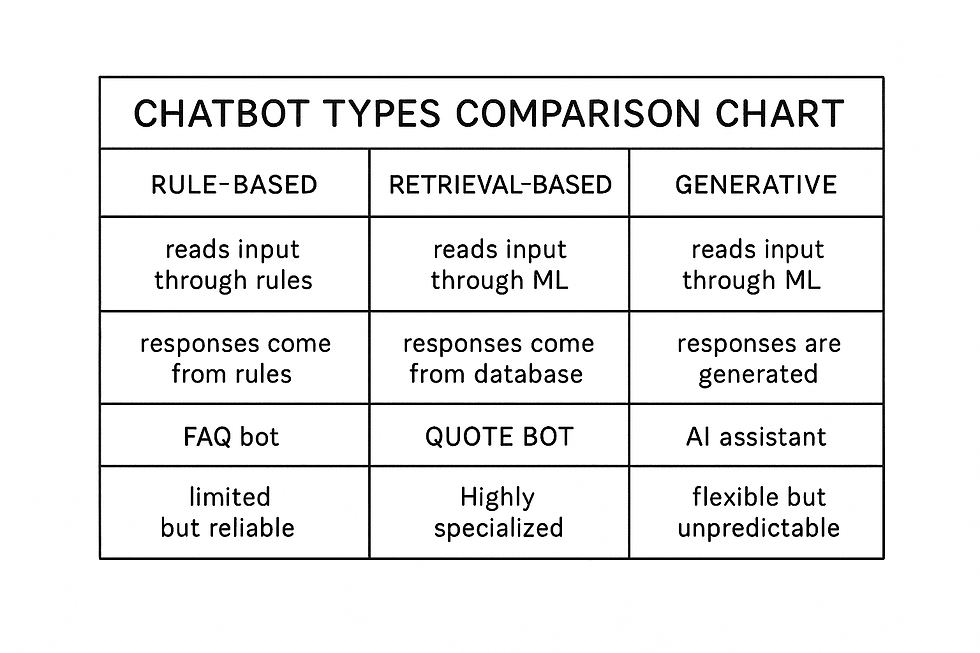
A chatbot is, at its heart, a machine designed to participate in a conversation with a human. It may not think, understand, or reason as a person does, but it is built to imitate the familiar rhythms of dialogue. The purpose of a chatbot is not to replace human communication, but to assist, to guide, or to automate a narrow set of interactions. What matters most is how the bot interprets what the user says and how it decides what to say in return. The nature of that decision-making process is what separates one type of chatbot from another.
The Simplicity and Limits of Rule-Based Chatbots
The earliest and simplest chatbots rely entirely on rules. These systems behave like a carefully arranged collection of “if this, then that” instructions. If a user says a word like “sad,” the bot may respond with a line containing sympathy. If the user asks a question containing a keyword such as “weather,” it may retrieve a predefined statement about forecasts. While these systems can appear clever for narrow tasks, they cannot truly adapt. They do not interpret meaning; they merely detect patterns and map them to scripted responses. Their strength lies in predictability, and their weakness lies in their inability to move beyond the rules they are given.
Retrieval-Based Chatbots and the Search for Better Answers
A retrieval-based chatbot extends beyond scripts by consulting a larger body of information. When a user asks a question, the bot searches its stored knowledge—documents, FAQs, conversation examples—and selects the closest matching answer. This allows it to appear more flexible than a purely rule-based system, but it still does not generate new thoughts. Instead, it chooses from what it already has. The quality of such a bot depends entirely on the quality and variety of the material it can retrieve. When used properly, it can provide accurate and reliable information, but it remains limited by its inability to create or reason beyond its library of responses.
Generative Chatbots and the Illusion of Understanding
Generative chatbots represent a new category, one that produces original sentences rather than selecting from existing ones. They analyze patterns in language on a grand scale and use statistical relationships to predict what words might come next. The result can be surprisingly fluid and wide-ranging. These bots can draft stories, answer open-ended questions, or hold extended conversations on many topics. Yet it is important to understand the truth beneath the appearance: they generate plausible language, not understanding. Their strength is adaptability; their weakness is that their confidence can mask uncertainty or error. They respond creatively but without comprehension.
Knowing the Difference Matters for Every Builder
Each type of chatbot serves a different purpose. A rule-based bot provides reliability. A retrieval-based bot provides consistency. A generative bot provides flexibility and fluency. When creating an AI system, the choice among these types should reflect the demands of the task, the expectations of the user, and the responsibility entrusted to the machine. A thoughtful designer chooses the simplest approach that accomplishes the goal, remembering that good conversation with a machine depends not only on what the bot can say, but on what the human expects from it.
My Name is Alan Kay: Computing Pioneer & Human–Machine Interaction
I was born in 1940, and from a young age I was drawn to the idea that computers could become more than cold, calculating machines. I imagined them as partners—tools people could use to think, explore, and create. Long before chatbots existed, I was fascinated by how humans interact with information and how computers might someday participate in those interactions. My early work was driven by a simple belief: technology should adapt to people, not the other way around.

The Birth of Personal Computing and Its Influence on Conversational Systems
During the 1970s, at Xerox PARC, I helped develop the Dynabook concept—a vision of personal, portable computers designed for learning and communication. Although the Dynabook wasn’t a chatbot, the ideas behind it deeply shaped what conversational AI would later become. We wanted computers to support natural exploration, encourage curiosity, and communicate in ways that made sense to ordinary people. The same principles stand behind today’s AI systems, especially chatbots: they should feel approachable, intuitive, and empowering.
Experimenting with Early Human–Machine Dialogue
As computing evolved, I became increasingly interested in how machines could engage in conversation. Early chat systems were primitive—little more than scripts and pattern-matching programs—but I saw in them the beginning of something important. These systems hinted at the possibility of computers participating in dialogue rather than simply displaying output. Even though the technology was limited, it pointed toward a future where learning, creativity, and communication could be supported by machines that felt more like collaborators than calculators.
Understanding the Limitations of Rule-Based Bots
I watched early chatbots closely, including rule-based programs that relied entirely on predefined patterns. They could respond convincingly in narrow situations but collapsed the moment a user drifted outside the script. Their fragility revealed a deeper truth: real conversation requires understanding, context, and flexibility—qualities far beyond the reach of rule-based models. These early bots taught us that imitation of understanding is not the same as understanding itself, and that the illusion of intelligence must not be mistaken for the real thing.
The Ethical Responsibilities of Building Conversational AI
As conversational technologies advanced, so did the ethical questions surrounding them. I believed strongly that computers should extend human potential, not manipulate or deceive. A chatbot designed without ethical care can give a false sense of intelligence or authority, leading users to trust it more than they should. I urged designers to remain transparent about limitations, honest about capabilities, and thoughtful about the consequences of human–machine dialogue. A conversational AI should enhance human agency, not diminish it.
Reflections on the Future of Conversations with Machines
Near the end of my career, I saw conversational systems evolve far beyond anything we imagined in the early days of computing. Generative models could write, summarize, tutor, and mimic the cadence of human speech. Yet the same lessons from the past still applied: the power of these systems lies not in their vocabulary but in how thoughtfully we use them. The potential is enormous—education, creativity, exploration—but so are the responsibilities. A machine can generate dialogue, but only humans can ensure that dialogue serves meaningful, ethical purposes.
Collecting and Structuring Data for AI Apps - Told by Alan Kay
When you set out to build an AI app, it is tempting to think first about features, interfaces, or clever outputs. But the truth is that none of those elements matter unless the data beneath them is clear, organized, and suited for the task. Data is the ground the entire system stands on. If that ground is uneven or poorly prepared, everything built on top of it becomes unstable. A simple AI app becomes possible when its data is shaped with intention and clarity.

Starting with Basic Datasets
Most AI apps begin with surprisingly small datasets. These might include a list of prompts, examples of expected outputs, or reference material your system will retrieve or interpret. In no-code tools, these datasets often take the form of tables or spreadsheets. The key is not size but structure. You must decide what belongs in each column, what labels make sense, and how the system will use the information. A well-structured dataset allows even a modest AI model to behave intelligently because it can reliably find what it needs.
Using User Inputs as Living Data
Every interaction a user has with your app becomes a new piece of data. The questions they ask, the information they provide, and the choices they make all contribute to shaping the system’s behavior. It is essential to design input fields with clarity—text boxes, drop-down menus, toggles—each with a specific and intentional role. By defining exactly what kind of information you want from the user, you prevent confusion and keep the data flowing into your system clean and consistent. In this way, user input becomes a form of guided collaboration.
Choosing the Right Storage Options in No-Code Tools
No-code platforms handle data storage in ways that are both simple and powerful. Glide often uses spreadsheet-like tables, making it easy to see and edit information directly. Bubble provides fully structured databases with custom fields and relationships. These differences matter because the way you store data influences how your AI app retrieves and uses it. A simple AI app benefits from a single, clearly defined table, while more advanced tools may require related tables that connect through unique identifiers. The goal is always the same: store data in a form that is easy for both humans and machines to understand.
Designing Data Flow with the Future in Mind
As you build, think not only about the immediate purpose of your data but also how it might grow. Will users add more entries over time? Will your app need to search large lists, categorize items, or track changes? By anticipating these needs early, you create a foundation that can expand gracefully. Thoughtful data flow allows your app to remain simple for the user even as its internal structure becomes more capable.
Bringing Structure, Input, and Storage Together
Collecting data, shaping it, and storing it well is not a technical chore—it is the act of defining the intelligence of your app. An AI system is only as reliable as the data it draws from and the clarity with which that data is organized. In no-code environments, this process is accessible, visual, and forgiving, making it an ideal starting point for anyone learning to build intelligent tools. When your data is structured with care, even the simplest app can feel elegant, intuitive, and surprisingly powerful.
Designing Conversations with Voiceflow (Conversation Mapping) - Told by Kay
When designing a conversational system, you must think of dialogue as a kind of user interface. Instead of buttons and menus, you work with words, intentions, and responses. Voiceflow offers a visual way to build these interactions, turning conversation into a series of paths the user might walk. When you begin to see dialogue as a structured environment rather than a free exchange, you gain the ability to design it with clarity and intention.

Defining Intents as the User’s Purposes
The foundation of any conversation map is the intent—the purpose behind what the user says. Voiceflow allows you to define these intents explicitly. An intent might be “ask for help,” “request information,” or “submit a task.” By naming these purposes, you allow the system to recognize what the user wants, not just what they say. It is a shift from hearing words to understanding direction, and it gives your chatbot a sense of direction in the conversation.
Collecting Utterances to Capture Natural Language
People rarely say things the same way twice, so a good conversational design includes multiple utterances—varied phrases that point to the same intent. In Voiceflow, you gather these utterances to help the system recognize the many ways a user might express a need. This helps the chatbot feel flexible and responsive. The goal is not to predict every possible sentence, but to provide enough examples that the system can generalize from them. Utterances become the bridge between human expression and structured logic.
Building Decision Trees to Shape the Path
Once you understand intents, you must decide how the system should respond. This is where decision trees come in. A decision tree outlines the branches the user can follow based on their input. Each branch leads to a different part of the conversation, from asking clarifying questions to providing answers or guiding the user forward. Good decision trees keep the user from feeling lost. They help the system stay oriented, even as the conversation takes unexpected turns. In Voiceflow, these branches become nodes and connections that mirror your reasoning.
Using Flow Logic to Keep the Conversation Coherent
Flow logic is the connective tissue of the entire system. It determines when to move to the next step, when to repeat a question, and when to change direction entirely. This logic is what makes a chatbot feel intelligent, not because it thinks, but because it follows a structure designed with care. Voiceflow gives you tools such as condition checks, variables, and transitions to keep the flow stable. When applied thoughtfully, these elements create conversations that feel smooth and intuitive.
Bringing It All Together into a Clear Conversation Map
A well-designed conversation map is more than a set of responses; it is a crafted experience. Intents give the system purpose, utterances help it understand language, decision trees shape the journey, and flow logic keeps everything coherent. When combined in Voiceflow’s visual workspace, these elements transform conversation into a navigable structure. The goal is always to help the user reach their destination without confusion, hesitation, or unnecessary complexity. In this sense, conversation design becomes a form of interface design—one that relies on understanding how people think and speak, and guiding them through an experience that feels both natural and thoughtfully planned.
Building a No-Code Mobile AI App with Glide or Bubble
Whenever I build a no-code mobile AI app, I begin by asking a simple question: what is the single problem this app needs to solve? The clearer the purpose, the easier every decision becomes—from layout to data handling to AI integration. Whether I’m building something for students, teachers, or one of my own companies, I focus on defining the core user story. Once I know exactly what the user needs to accomplish, I can design an interface that supports that goal without distractions.

Designing the Interface with the End User in Mind
Glide and Bubble each bring their own style to interface building. Glide encourages a clean, data-driven structure. Bubble grants the freedom of full customization. But regardless of the tool, I always begin with sketches or mental maps of how a user will navigate the app. Where will they enter information? How will they trigger the AI? Where will they see results? These questions shape the layout. A good interface should feel like a guided path—each element present for a reason and every step obvious without explanation. When building in Glide, I frequently lean on list screens, detail views, and simple input components. In Bubble, I arrange containers, groups, and buttons to make the experience smooth and intuitive.
Connecting the App to an AI API
Once the interface feels right, the heart of the project comes next: linking the app to an AI model. In Glide, this usually means using the API connector, pasting in the OpenAI endpoint, mapping the fields, and defining what data gets sent. Bubble takes the same philosophy but offers more technical flexibility with its API plugin. The flow is always similar: the user input becomes the prompt, the AI model processes it, and the app displays the result. This moment transforms the app from a digital form into a responsive, intelligent assistant. I often test these API calls several times to ensure consistency and clarity, adjusting parameters or prompt wording as needed.
Shaping the Flow Around AI Responses
After the AI connection works, I test how the results appear from the user’s perspective. If the AI generates text, it needs to be readable and accessible. If it recommends actions, the layout should highlight them. I avoid burying the response behind extra taps or hidden screens. The user should feel the AI’s presence immediately and understand that the app is working with them. In Bubble, I sometimes add loading indicators or animations to keep the experience smooth. Glide’s simplicity naturally lends itself to a clean presentation.
Refining Through Real Testing
Testing is where the app’s true personality reveals itself. I use real data, real prompts, and real devices to see how everything flows. Sometimes the interface needs tightening. Sometimes the AI needs clearer instructions. Sometimes the user path needs another nudge or shortcut. These small refinements are what transform a functional prototype into something people genuinely enjoy using. I’ve found that even minor improvements—renaming a button, adjusting spacing, clarifying a prompt—can dramatically improve usability.
Publishing and Sharing the Finished App
When the app finally feels polished, the publishing step is wonderfully simple. Glide generates a link or installable app immediately, allowing users to access it like a native mobile tool. Bubble offers full deployment to a domain, giving the app a professional home online. Publishing doesn’t feel like a grand finale but the beginning of seeing how others interact with what I’ve created. Their feedback shapes the next version, the next idea, or the next iteration.
Turning No-Code Tools into Practical Solutions
Building a no-code AI app with Glide or Bubble isn’t just about assembling features. It’s about shaping a helpful experience around a focused purpose. With a clear interface, a reliable AI connection, and thoughtful testing, even a newcomer can build something meaningful. These tools empower creators to launch ideas quickly, refine them with real users, and publish them without waiting for a developer. To me, that accessibility is what makes no-code development so powerful—it opens the door for anyone to turn a simple idea into a working reality.
Creating AI Chatbots with Botpress
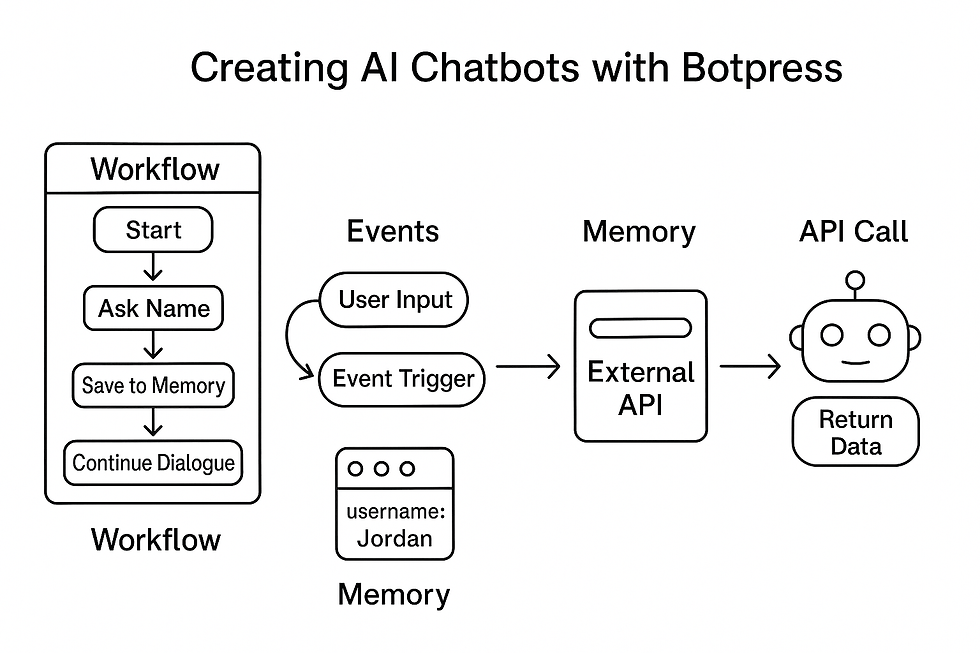
When I sit down to build a chatbot in Botpress, I begin by thinking less like a programmer and more like a conversation architect. A bot is not just a series of responses—it’s a structured experience. Botpress gives you the tools to shape that experience visually, and the first step is understanding how the pieces fit together. Workflows, events, memory, and API calls are not technical hurdles; they’re the ingredients that allow your chatbot to feel capable, natural, and purposeful.
Designing Workflows That Guide the User
Workflows in Botpress are the backbone of the bot’s logic. Each workflow represents a distinct path the user can travel—such as asking a question, filling out a form, or completing a task. When I build a workflow, I think of it as a story with a clear beginning, middle, and end. The user starts with a question or intention, the bot gathers the right information, and then it delivers the answer or action. Botpress’s flow editor makes it easy to visualize each step, but the real craft lies in anticipating what the user wants and shaping the workflow to guide them there smoothly.
Using Events to Keep the Bot Responsive
Every message the user sends is an event, and Botpress treats events as signals that trigger actions. Understanding events is essential because they determine how reactive your bot feels. If a user suddenly changes topics, the bot should notice. If the user provides missing information, the bot should adapt without restarting the conversation. Events allow your bot to stay flexible rather than rigid. Whenever I build, I rely on events to create bots that feel less like scripts and more like responsive assistants.
Leveraging Memory to Make the Bot Feel Intelligent
One of the most powerful features in Botpress is memory. When the bot remembers what the user said earlier—preferences, names, details, or ongoing tasks—the conversation becomes smoother and more natural. I often use short-term memory to track the current task and long-term memory to store details the user might return to later. When memory is used well, the bot doesn’t need to re-ask questions or treat every message as a new encounter. Instead, it feels like it’s genuinely following the thread of the conversation.
Connecting to APIs to Expand the Bot’s Capabilities
A chatbot becomes truly useful when it can access information beyond its built-in responses. Botpress makes this possible by letting you connect to external APIs. Whether it’s pulling data from a database, fetching current information, or sending prompts to an AI model, API calls let your bot become part of a larger ecosystem. When I integrate an API, I map out exactly what the bot sends, what it receives, and how that response should shape the next step in the conversation. This integration turns a simple conversational tool into a problem-solving assistant.
Bringing It All Together with Thoughtful Design
Once workflows, events, memory, and API calls are in place, the bot begins to feel alive. But I’ve learned that successful chatbot design is not about showing off every possible feature. It’s about creating clarity, consistency, and purpose. Each workflow should have a reason to exist. Each event should improve responsiveness. Each memory should help the bot support the user, not confuse them. And each API call should make the bot more capable without overwhelming the experience.
Creating Bots That Truly Help People
Botpress gives us a powerful platform to build chatbots that feel sophisticated without being overcomplicated. By combining structured workflows, thoughtful event handling, practical memory use, and smart API integrations, anyone can create a bot that genuinely assists its users. For me, the best chatbots are the ones that solve real problems with simplicity and care. They don’t pretend to be human—they simply help humans accomplish what they came to do, one clear conversation at a time.
Using OpenAI Playground to Prototype Bot Behaviors
Whenever I open the OpenAI Playground, I treat it like a workshop table—empty, flexible, and ready for experimentation. The Playground is where ideas are shaped before they ever touch a no-code tool or a chatbot framework. It gives me a safe space to explore how the AI reacts, how it interprets instructions, and how it behaves under different conditions. Before building anything, I spend time here, testing what the bot should sound like, what rules it should follow, and how it should respond to unusual questions. This early exploration often saves me hours later.

Testing Prompts to Shape the Bot’s Voice
Prompts are the heart of any AI system, and the Playground lets me see exactly how different phrasing changes the outcome. I start by writing a clear system message that defines who the bot is supposed to be. Then I try slight variations—shorter, longer, more specific, more friendly—to see how the model shifts its tone. This step helps me discover the exact wording that gives the bot the personality I want. Whether the bot needs to be a helpful tutor, a concise assistant, or a playful guide, the Playground reveals how sensitive the AI is to changes in instruction.
Adjusting Temperature to Control Creativity
Temperature is one of the most important settings I experiment with. A lower temperature produces more predictable, stable answers—perfect for tools that need accuracy and consistency. A higher temperature introduces creativity, variation, and sometimes surprising ideas. Depending on the purpose of the bot, I adjust this slider to find the right balance. When I’m building something that must stay on topic, I lean toward structure. If the bot needs to brainstorm, explore, or entertain, I dial the temperature up. The Playground allows me to see these differences instantly, which helps me tune the bot’s behavior before integrating it anywhere else.
Creating System Personas for Reliability
One of my favorite uses of the Playground is shaping system personas—those behind-the-scenes instructions that define the bot’s identity. A system persona might be a history professor, a financial mentor, a game guide, or a calm problem solver. By testing these personas in the Playground, I can verify that the bot behaves consistently, follows rules, and maintains the right voice. I try extreme examples, tricky questions, and edge cases to ensure the persona holds up. This debugging phase strengthens the bot’s reliability before it ever interacts with real users.
Iterating Until the Behavior Feels Right
I never settle on the first version of a prompt or persona. The Playground encourages iteration because adjustments are quick and the feedback is instant. I tweak phrasing, add guidelines, remove unnecessary restrictions, and run new tests. Each iteration sharpens the bot’s identity and helps me uncover potential weaknesses. Sometimes a single sentence added to the system message transforms the entire experience. This process feels more like sculpting than coding—shaping and refining until the AI behaves exactly as intended.
Saving and Exporting Results for Real-World Use
Once the bot’s behavior feels stable and predictable, I save the prompt structure and settings. These become the blueprint for the chatbot inside Glide, Bubble, Botpress, or a Custom GPT. Because the Playground reveals how the AI thinks, it helps me avoid confusion later when connecting to APIs or building workflows. Every successful project I’ve built with AI starts with this prototyping step—it’s the foundation that supports the entire system.
Turning Exploration Into a Reliable Bot
Using the OpenAI Playground isn’t just about testing prompts; it’s about learning how the AI interprets intention. The Playground teaches me what the bot needs to perform well and how small adjustments can improve clarity, accuracy, and personality. This early experimentation transforms a vague idea into a dependable conversational partner. By the time the bot leaves the Playground and enters a real application, it already has a voice, a purpose, and a well-tested identity.
Launching a Bot Demo with Hugging Face Spaces - Told by Zack Edwards
Whenever I prepare to launch a bot on Hugging Face Spaces, I begin with a simple goal: make the experience accessible to anyone with a link. Spaces is one of the easiest ways to share an AI project with the world because it turns your work into a live, interactive webpage. Whether the bot is for students, teachers, or a broader online audience, I want people to be able to try it instantly—no installations, no accounts, just a clean demonstration of what the bot can do.

Choosing the Right Gradio or Spaces Template
Hugging Face offers templates for different types of projects, but for chatbots, Gradio is often the perfect fit. A Gradio interface can be as simple as a text box and a response area, or as polished as a full chat window with avatars and formatting. When I select a template, I look for one that matches the tone and purpose of the bot. If it’s educational, I choose a clean and structured layout. If it’s creative or playful, I use a layout that gives the bot space to express itself. These templates let me focus on the behavior of the bot rather than the design details.
Connecting the Bot to an AI Model
Once the interface is set, the next step is linking the bot to an AI model. In Spaces, this usually means writing a small Gradio script that sends user messages to an OpenAI endpoint or a hosted model on Hugging Face. Even though it involves a few lines of code, the structure is straightforward: define the input, send it to the model, receive the output, and display it in the interface. This connection turns a blank page into a functioning chatbot. I always test this locally first to ensure the response feels natural and the timing is smooth.
Customizing the User Experience
After the bot is technically working, I refine the user experience. I adjust labels, streamline the interface, and remove anything that might distract or confuse first-time users. Sometimes I add a description or a brief set of instructions at the top of the page to help people understand what the bot is designed to do. If the bot serves a specific audience—like history students or small business owners—I tailor the interface and messaging to match their expectations. A good demo doesn’t just work; it guides the user gently into trying the tool.
Publishing Your Space for the World to See
Once everything feels polished, publishing is as simple as clicking “Create Space” and pushing the files to the platform. Hugging Face instantly builds and hosts the demo, turning it into a shareable link. This moment always feels like opening a curtain on a stage—you’ve prepared the bot, refined the experience, and now it’s ready for the audience. Spaces also lets you update your project at any time, so improvements and fixes become part of the natural lifecycle of the app.
Gathering Feedback from Real Users
Sharing the bot publicly is only the beginning. I pay close attention to how people interact with the demo—what questions they ask, how they test its limits, and where it might struggle. This feedback is gold. It helps me refine prompts, adjust responses, or rethink how the interface supports the user. The openness of Spaces makes this process simple, because anyone can try the bot from anywhere, giving a wide range of perspectives that I wouldn’t get otherwise.
Creating Your Own Custom GPT in ChatGPT - Told by Zack Edwards
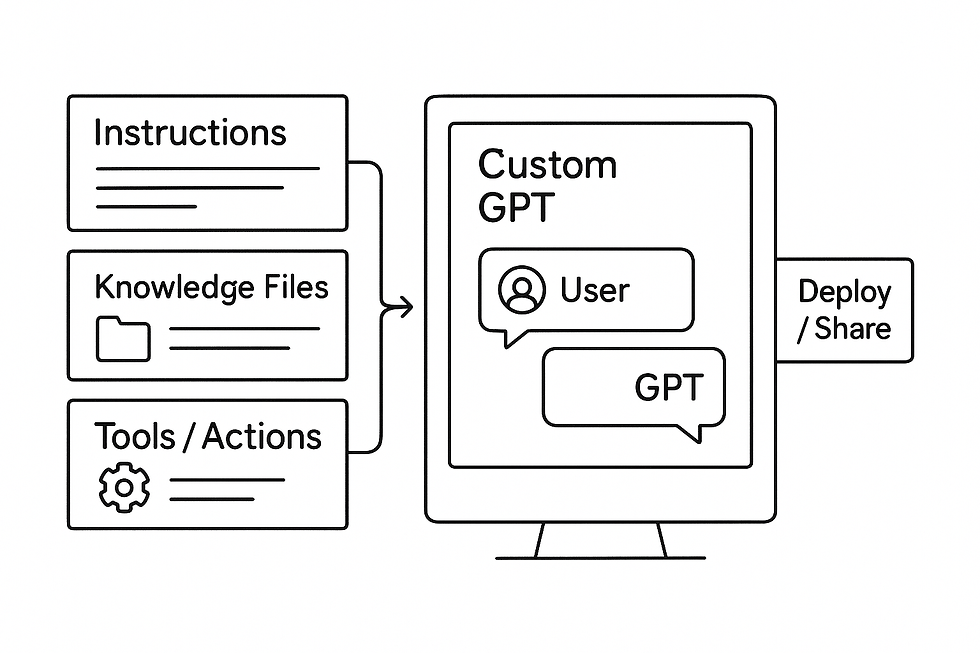
When I start creating a Custom GPT, I think about the assistant I wish I had at my side—an AI that understands my goals, follows my style, and helps me solve real problems without needing constant correction. Custom GPTs allow anyone to build their own specialized assistant, shaped by the knowledge, tone, and behaviors they choose. Before I click “Create,” I take a moment to picture the personality, purpose, and capabilities I want the GPT to embody.
Uploading Knowledge to Give the GPT Its Foundation
A Custom GPT becomes truly useful when it has the right information at its core. Whether it’s curriculum material, business SOPs, historical content, or instructions for a game, I upload only the files that directly support the GPT’s purpose. These documents act like a private reference library that the assistant can draw from. The key is relevance—too many files can dilute the GPT’s accuracy, while focused, well-structured knowledge helps it produce consistent and reliable answers. I test the GPT as I upload documents, making sure it understands them clearly.
Setting Rules That Shape Behavior
Once the knowledge is in place, I begin writing the instructions that determine how the GPT behaves. This is where I guide its tone, define what it should avoid, and explain how it should interpret user requests. I might tell it to remain calm and clear, to provide detailed explanations, or to always ask clarifying questions when uncertain. These rules are not rigid commands but guiding principles that give the GPT stability. A well-constructed instruction set can transform a generic assistant into a dependable partner that communicates in a consistent voice.
Adding Actions to Expand Its Abilities
Actions are where a Custom GPT becomes more than a conversational tool—it becomes a functional system. With actions, the GPT can connect to APIs, pull data from other platforms, generate documents, or perform specific tasks. Whenever I add an action, I think carefully about how it enhances the user experience. Each action should solve a concrete need, like generating lesson plans, searching a private database, or creating structured reports. These integrations allow the GPT to bridge the gap between conversation and execution, which is where the real magic begins.
Testing the Assistant Through Real Interactions
Before publishing, I spend time interacting with the Custom GPT exactly as a user would. I test its tone, its reasoning, and its ability to follow the rules I’ve written. I ask questions that are inside its knowledge base and ones that sit at the edges. This step helps me uncover misunderstandings, refine its instructions, or adjust the documents I uploaded. Each iteration makes the GPT more reliable and more aligned with the purpose I envisioned at the beginning.
Deploying the GPT for Others to Use
Once I’m satisfied with its performance, I deploy the GPT and decide whether to make it public or private. Deployment is instant, but the real value appears when others begin using it. Students, educators, or team members often discover uses I didn’t anticipate, and their feedback helps me strengthen the GPT further. Deployment transforms the assistant from a private experiment into a shared tool with real-world impact.
Creating Assistants That Support Real Work
Building a Custom GPT is not about designing a perfect machine—it’s about creating a helper that understands its role and performs it consistently. By carefully uploading knowledge, crafting clear rules, integrating meaningful actions, and testing thoroughly, anyone can shape an AI assistant that genuinely supports their workflow. For me, Custom GPTs represent one of the most empowering tools in modern AI—they put the creative and functional power of intelligent assistants directly into the hands of the people who need them most.
Publishing, Embedding, and Maintaining Your AI Apps - Told by Zack Edwards
When I reach the point of publishing an AI app, I think of it as getting ready to open the doors of a new shop. The app might work beautifully on my screen, but the moment it meets real users, everything changes. Publishing is about making the experience accessible, stable, and ready for a wider audience. Before anything goes live, I double-check the user flow, make sure the AI responses feel reliable, and confirm that nothing in the interface creates confusion. This final preparation lays the foundation for everything that comes next.

Choosing the Right Hosting Method
Different hosting options serve different purposes. Glide gives me a simple installable link that behaves like a mobile app. Bubble lets me deploy to a custom domain and present the app like a polished website. Other tools offer embed codes that fit neatly into existing pages. The key is matching the hosting method to the audience. If the app is meant for quick mobile access, I choose Glide. If it needs to feel official or integrate into a larger system, I lean toward Bubble. Hosting isn’t just a technical step; it’s part of shaping the user’s first impression.
Embedding Your App Into Real Environments
Embedding is where your app becomes part of someone’s daily workflow. Sometimes I embed a chatbot widget into a webpage so users can access it without switching contexts. In other cases, I place an app inside a learning platform or a business dashboard. Embedding should always feel seamless. The user shouldn’t need to ask, “Where do I click next?” Instead, the app appears exactly where they expect it, ready to help. This integration is how AI tools blend into real systems and become genuinely useful.
Running User Tests to Reveal the Hidden Corners
No matter how carefully I design an app, the first round of user tests always surprises me. People click buttons in unexpected ways, ask unusual questions, or get stuck on parts of the interface that seemed obvious to me. User testing is not about catching rare bugs—it’s about uncovering assumptions I didn’t know I was making. I watch how testers move through the app, take notes on the rough spots, and adjust workflows or prompts accordingly. This stage is where the app stops being “mine” and starts becoming something shaped by the people who will actually use it.
Using Analytics to Understand Real Behavior
Once the app is published and in real use, analytics become essential. I track how often users interact with certain features, whether they drop off at specific steps, and how long they engage with the AI. These patterns tell me what works and what needs refinement. Sometimes the analytics reveal that a feature I thought was essential isn’t being used at all, or that users are relying heavily on a tool I designed as a secondary option. Data often reveals truths that intuition misses.
Updating and Improving Performance Over Time
Maintenance is not glamorous, but it’s where long-term success happens. I check AI responses regularly, update prompts when necessary, and watch for shifts in user behavior. If the app relies on external APIs, I make sure everything stays compatible as versions change. If the user base grows, I prepare for increased traffic. Improvements tend to come in small, steady updates rather than dramatic overhauls. These adjustments keep the app running smoothly and help it evolve alongside the people who depend on it.
Keeping Your AI App Alive and Relevant
Publishing an AI app isn’t the end of the project—it’s the beginning of its relationship with users. Embedding it into real environments makes it part of their routines. Testing reveals the gaps. Analytics shows the truth. Maintenance keeps everything running. Through this cycle, the app grows more refined, more helpful, and more aligned with the needs of the people it serves. For me, the real reward is seeing an idea evolve into something practical and reliable, something that makes everyday tasks easier for real users in the real world.
Vocabular to Learn While Learning About Using AI in Coding and Programming
1. Interface
Definition: The part of an app that users see and interact with.Sentence: We redesigned the interface so users could easily find the AI’s response.
2. Workflow
Definition: A sequence of steps that control how a chatbot or app behaves.Sentence: In Botpress, we built a workflow to guide the user from a question to the final answer.
3. Intent
Definition: The purpose behind what a user is trying to say to a chatbot.Sentence: The AI recognized the user’s intent as asking for directions.
4. Utterance
Definition: A phrase or sentence a user might say that expresses a specific intent.Sentence: “How’s the weather?” is an utterance that belongs to the Weather intent.
5. Dataset
Definition: A collection of organized information that an AI app uses or analyzes.Sentence: The student uploaded a dataset of vocabulary words for the AI to quiz them on.
6. Deployment
Definition: The process of publishing an app or chatbot so others can use it.Sentence: After testing, we moved the app to deployment so students could try it.
7. Temperature
Definition: A setting that controls how creative or predictable an AI model’s responses are.Sentence: We lowered the temperature to make the chatbot give more consistent answers.
8. Retrieval
Definition: The process of pulling information from a database or document.Sentence: The chatbot uses retrieval to search its stored notes before responding.
9. Node
Definition: A block or step in a visual workflow that represents an action or message.Sentence: In Voiceflow, each node represents part of the conversation path.
10. Embedding (App Embedding)
Definition: Placing an AI app or chatbot inside another website or platform.Sentence: We used an embed code to place the chatbot on the school’s homepage.
Activities to Demonstrate While Learning About AI in Coding and Programming
Custom GPT Creation Workshop – Recommended: Intermediate to Advanced Students
Activity Description: Students build their own Custom GPT inside ChatGPT, giving it a personality, rules, and uploaded knowledge files.
Objective: Teach students how prompts, instructions, and knowledge bases shape AI behavior.
Materials:• ChatGPT Plus or Team account• Short PDF or Google Doc created by studentsInstructions:
Students choose a role for their GPT (science tutor, creative writer, language coach).
They write a system instruction describing its job and personality.
Students upload a small knowledge file they wrote themselves.
Test the GPT with questions.
Adjust rules or add more instructions for clarity.
Learning Outcome: Students see how AI personality and capability emerge from instructions and data, not from magic.
Build a Chatbot with Botpress and Memory Features – Recommended: Intermediate to Advanced
Activity Description: Students create a Botpress chatbot that remembers the user’s name or preferences using short-term memory.
Objective: Teach students how AI systems store and reuse information to make conversations feel natural.
Materials:• Botpress Cloud account• Sample script provided by teacher
Instructions:
Students make a new chatbot in Botpress.
Create a workflow where the bot asks the user’s name.
Store it using Botpress memory variables.
Continue the conversation using that stored memory (example: “Nice to meet you, Jordan.”).
Test the bot with several users.
Learning Outcome: Students understand how memory enhances conversation flow and realism in chatbots.
AI App “Shark Tank” Pitch – Recommended: Intermediate to Advanced Students
Activity Description: Small groups design an AI app idea and pitch it to the class using slides or posters. They can use ChatGPT to help develop the concept.
Objective: Introduce students to product design thinking and communication.
Materials:• Poster paper or Google Slides• Access to ChatGPT• Markers or digital graphics
Instructions:
Students brainstorm an idea for an AI app (health tracker, school helper, game companion).
They use ChatGPT to develop the purpose, features, and potential users.
Groups create a one-minute pitch.
Class votes on “Most helpful,” “Most creative,” or “Most realistic.”
Learning Outcome: Students practice creativity, teamwork, and explaining AI concepts clearly.
Debug the Bot Challenge – Recommended: Intermediate to Advanced Students
Activity Description: Students test a chatbot or app that contains intentional mistakes, then identify and fix them.
Objective: Teach critical thinking, problem-solving, and debugging.
Materials:• A teacher-created “broken bot”• Access to Botpress, Glide, or Bubble• Debug worksheet
Instructions:
Students use the bot and record problems (wrong responses, missing steps, confusing prompts).
They review the workflow or interface to find the cause.
Students propose or apply fixes.
Retest the bot to confirm improved behavior.
Learning Outcome: Students learn that errors are normal and that debugging is part of real AI development.
Building a Simple AI App and Chatbot
When I teach students or adults how to build their first simple AI app or chatbot, I always begin with the same approach: start small, move step-by-step, and let the tools do the heavy lifting. You don’t need deep programming knowledge. You just need a clear idea of what you want your AI to do and the willingness to experiment. In this activity, I’ll walk you through a full build—from crafting your bot’s personality in the OpenAI Playground, to creating an app in Glide, to testing a chatbot flow in Voiceflow. Everything here uses real links, real prompts, and a beginner-friendly approach.
Step 1: Prototyping the AI’s Behavior in the OpenAI PlaygroundThe first place I go is the OpenAI Playground: https://platform.openai.com/playground
There, I begin shaping how the bot should speak and respond. This is where your bot’s “brain” is trained through words instead of code. I type a system instruction like this:System prompt: “You are a helpful AI assistant designed to explain concepts in simple language. Always give short, clear answers and ask a follow-up question to continue the conversation.”
I set the temperature to 0.5 for balanced creativity and stability. Then I test by entering user messages such as:User prompt: “Explain what an AI model is in simple terms.”
The Playground lets me refine the bot’s tone until it feels right. Every tweak here—word choice, structure, personality—will shape how the bot behaves later in the app.
Step 2: Building a Glide Mobile App with an AI Input FieldOnce I'm satisfied with the bot’s personality, I create a small mobile app using Glide: https://www.glideapps.com
I start by creating a Google Sheet with two columns:Column A: User InputColumn B: AI Response
This becomes the app’s data source. Inside Glide, I add a text input field connected to “User Input.” Next, I use the API integration tool to call the OpenAI endpoint. Glide asks for the API URL, which is:https://api.openai.com/v1/chat/completions
And I paste this JSON template:{"model": "gpt-4o-mini","messages": [{"role": "system", "content": "You are a simple helper who answers in one paragraph."},{"role": "user", "content": "{User Input}"}]}
Once the connection is made, I set the “AI Response” column to store the returned text. I add a results box so users can instantly see the AI’s answer after clicking a button. This becomes a functional mobile app—simple, clean, and powered by the personality I prototyped earlier.
Step 3: Designing the Chatbot Conversation in VoiceflowTo make the experience feel like a real chatbot, I move to Voiceflow:https://www.voiceflow.com
Here, I create a new assistant and design the interaction visually. I drag out an Intent block and set it to recognize phrases like “help me with homework,” “I have a question,” or “I need advice.” Then I add an AI block connected to OpenAI. In the prompt field, I place: “You are a friendly tutor who explains answers step-by-step. Use short paragraphs.”
Next, I create a flow:User Says → Intent Recognized → AI Block → Bot Responds → Ask Follow-up Question
Voiceflow allows me to test the entire flow with a built-in simulator. I type a question to see how the bot reacts, adjusting the flow until it feels natural.
Step 4: Turning the Prototype Into a Working DemoOnce I have both the mobile app and the conversation design ready, I publish them so students can try them instantly. Glide gives me a shareable link like: https://myapp.glide.page
Voiceflow gives me a test link where the bot can be accessed directly in a browser. Together, these tools create a simple AI system: a mobile app powered by an API and a chatbot that understands multiple phrases.
Step 5: Adding a Simple Cloud Deployment OptionIf I want to show students how to create a public-facing prototype, I take the code from the Playground and paste it into a Gradio template on Hugging Face Spaces:https://huggingface.co/spaces
Using this sample Gradio code:import gradio as grimport openai
def ask(question):completion = client.chat.completions.create(model="gpt-4o-mini",messages=[{"role": "user", "content": question}])return completion.choices[0].message["content"]
interface = gr.Interface(fn=ask, inputs="text", outputs="text")interface.launch()
Now anyone can try the bot without needing an account or special tools.
Step 6: Helping Students Build Their Own VersionTo help students replicate the activity, I guide them to begin with their own bot personality in the Playground. Once they’re satisfied, they insert that personality into Glide or Voiceflow. Some students prefer building apps; others prefer building chatbots. Both paths work beautifully. This activity helps them understand how AI apps are created in the real world: by prototyping behavior, designing simple flows, and connecting those flows to AI models.
A Simple Path to Real AI CreationWhat makes this activity powerful is how approachable it is. Students experience prompt engineering, app development, chatbot flow creation, and deployment—without writing heavy code. Everything feels like building with blocks. By the time they’re done, they’ve created something real: a working AI app and a chatbot that reflects their own design. They don’t just learn how AI works—they create something with it, and that’s what makes this chapter so transformative.


Comments