
Chapter 23 - AI Automation and Productivity Tools
- Zack Edwards
- 9 hours ago
- 37 min read

My Name is W. Edwards Deming: Architect of Quality and Systems Thinking
I was born in 1900 in Sioux City, Iowa, at the dawn of a century defined by invention and rapid change. As a child, I was fascinated by patterns—how numbers connected, how processes worked, and how even ordinary tasks had hidden rhythms beneath them. This early interest led me to engineering and mathematics, fields that would shape my understanding of how the world fit together. I never looked at events as isolated moments. I saw them as parts of systems, interconnected and full of cause and effect.

Discovering the Flaws in American IndustryIn my early career, I worked as a statistician for the U.S. Department of Agriculture and later the Census Bureau. The deeper I dove into the world of data, the more I realized how poorly many organizations used information. Factories treated defects as accidents. Managers blamed workers for mistakes. Businesses relied on guesswork instead of measurements. I saw waste not just in materials and time, but in human potential. A factory was not a collection of workers and machines—it was a system. And if the system was flawed, no amount of yelling or punishment could fix it.
The Journey to Japan and a Nation Ready to ChangeAfter World War II, I traveled to Japan at the request of General Douglas MacArthur, who wanted to help rebuild Japanese industry. When I arrived, I found leaders who were eager to learn, hungry for improvement, and humble about their weaknesses. They welcomed my ideas on statistical quality control and systems thinking with open arms. I taught them that quality must be built into a process, not inspected at the end. I emphasized that the majority of defects were the fault of the system, not the workers. My message was simple: improve the system, and everything else improves with it.
The PDCA Cycle and Continuous ImprovementOne of my most enduring contributions was the PDCA cycle: Plan, Do, Check, Act. It was not a slogan but a disciplined approach to learning. You plan carefully, carry out your plan, study the results, and act on what you learned. Then you repeat the cycle. Every cycle brings the system closer to excellence. It became the backbone of Japan’s kaizen philosophy—continuous improvement. This method transformed factories into learning organizations, and workers into problem-solvers instead of cogs in a machine.
Quality as a Way of Thinking, Not a DepartmentI taught that quality was not the job of a single department or inspector. It was the responsibility of everyone, from the CEO to the newest employee. Quality was not simply the absence of defects; it was the presence of understanding. You must know your processes, measure them, and remove the sources of errors rather than react to them after the fact. My message challenged many American companies, especially those clinging to outdated traditions. But in Japan, the philosophy took root so deeply that they would soon become leaders in global manufacturing.
Changing the World by Changing SystemsWhen Japanese companies began producing goods of unmatched reliability and consistency in the 1970s and 80s, the world finally took notice. People called it the “Japanese Economic Miracle,” but I saw it differently. It was not a miracle. It was the result of disciplined systems, continuous learning, and respect for data. Eventually, American companies invited me back to teach them what they had ignored decades earlier. My teachings influenced everything from automobile production to healthcare, government, and education.
Legacy of a Systems ThinkerLooking back, I see my life’s mission clearly: to show the world that people do not fail—systems do. When you improve the system, you improve the results. When you treat people with dignity and give them the tools to contribute their ideas, you unlock extraordinary potential. Quality is not an act; it is a habit, a culture, and a lifelong pursuit. Today, every automation system, every continuous improvement program, and every data-driven organization echoes the principles I spent my life teaching. I believed in the power of systems to shape outcomes, and the world has proven that belief again and again.
What Automation Really Means – Told by W. Edwards Deming
When we speak of automation, we must first speak of systems. A system is not a collection of isolated parts—it is a network of relationships, each influencing the others in ways often unseen. Automation enters the picture only when you understand how your system behaves. It does not stand alone. It is a method of ensuring the system performs consistently, without interruption, and without relying on human memory or luck. Automation is simply the predictable execution of a process inside a well-designed system.

The Role of Triggers in Starting WorkA trigger is the beginning of an action, but more importantly, it is the signal that the system is prepared to proceed. In manufacturing, the trigger might be a machine reaching a certain temperature or a part arriving on a conveyor. In the digital world, it might be receiving an email, updating a spreadsheet, or filling out a form. A trigger is not magic; it is a condition that tells the system, “Now is the time.” By defining triggers correctly, you ensure the system reacts at the right moment every time.
Actions as the Work That FollowsOnce the trigger fires, the system moves into action. An action is the task performed automatically after the signal is received. It might send a notification, sort information, create a record, or perform calculations. Actions replace repetitive human labor with reliable machine execution. But the real power lies not in removing people, but in freeing them. When machines handle repetitive tasks, people can invest their time in creativity, problem-solving, and improvement—activities machines are not suited for.
Workflows as the Path of ProgressA workflow is the sequence of steps that the system follows after the trigger. It is the roadmap of the process. I often taught that you cannot expect quality outcomes from a poorly designed process. Automation does not fix chaos; it merely executes chaos more quickly. A workflow must be designed with clarity, purpose, and consistency. When each step naturally leads to the next, the system becomes smooth and dependable. Automation amplifies good design, just as it exposes poor design.
Integrations and the Power of Interconnected ComponentsNo system operates in isolation. In my teachings, I emphasized collaboration between departments, because disjointed systems produce disjointed results. Integrations in automation serve the same purpose. They allow different tools, platforms, or applications to share information effortlessly. When a change in one part of the system instantly updates another, you eliminate delays, confusion, and manual transcription. Integrations help the whole system behave as one unified entity, rather than a collection of disconnected parts.
Eliminating Repetitive Tasks as a Path to ImprovementThe purpose of automation is not speed alone. It is the reduction of variation, error, and waste. Repetitive tasks often introduce human fatigue, inconsistency, and frustration. When machines handle these tasks, the system becomes more predictable and stable. It is not about replacing people—it is about allowing people to do work that requires judgment, insight, and innovation. Automation handles repetition so humans can focus on improvement, and improvement is the lifeblood of progress.
The Promise of a Predictable SystemAutomation, when properly applied, does not remove the human element. It enhances it. It ensures that processes are carried out the same way every time, forming a stable foundation upon which people can think, learn, and refine. A good system supports the worker. A good automation supports the system. And when both are aligned, the result is a process that is consistent, efficient, and always ready to improve with each cycle of learning.
Setting Up No-Code Automations with Zapier, Make & IFTTT
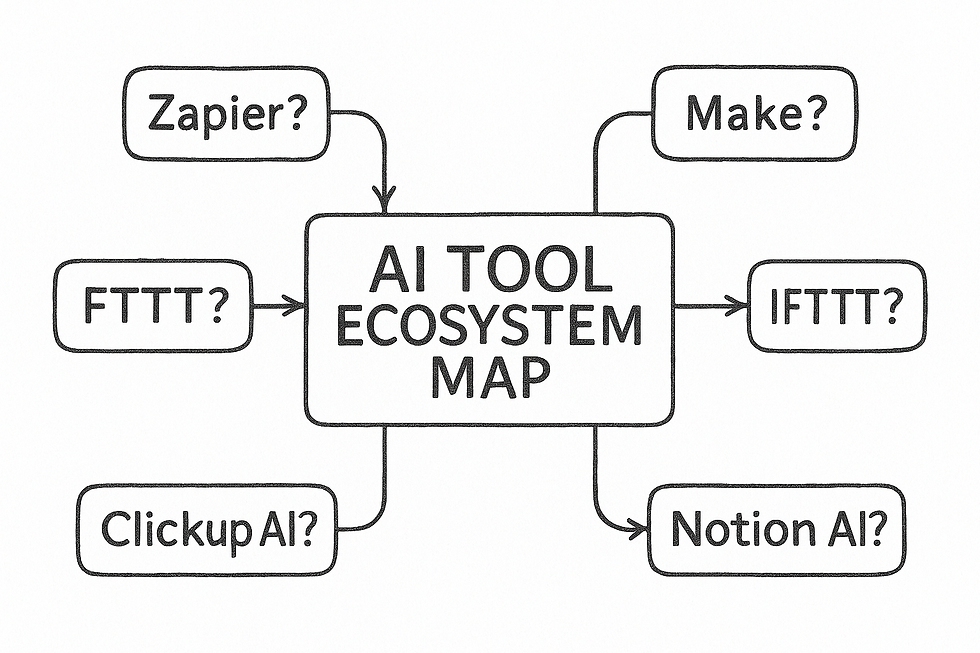
When I first stepped into the world of automation, I wasn’t looking for complex code or heavy programming. I simply wanted a way to connect the tools I used every day so they could work together without my constant attention. That’s when I discovered the world of no-code automation platforms. Zapier, Make, and IFTTT offered three different paths toward the same goal: letting my systems run while I focused on creativity, strategy, or teaching. Understanding how each platform thinks is the first step in choosing the right one for the right job.
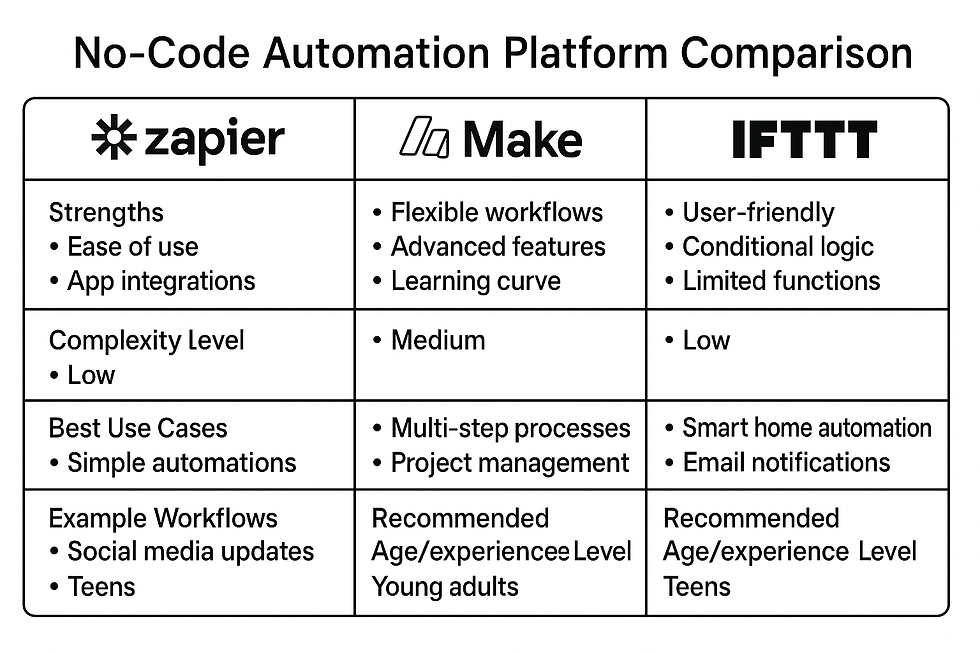
How Zapier Works and When to Use ItZapier became my go-to for business workflows and anything that required reliability. It works like a chain of dominoes: a trigger falls, and every action that follows falls in sequence. It focuses on clarity and simplicity, guiding me step-by-step as I build each “Zap.” Zapier excels when you need something stable and predictable, such as sending emails, updating spreadsheets, or generating tasks in project management tools. Its greatest strength lies in its consistency, but it can become expensive when you build large, multi-step automations. Still, its ease of use and huge library of app integrations make it perfect for people who want solid, dependable workflows without technical complexity.
How Make Works and When to Use ItMake is the visual mastermind of the automation world. Instead of thinking in straight lines, it lets you think in webs. When I needed to design something with multiple branches, decisions, filters, or loops, Make was the tool that gave me the freedom to do it. You can drag modules onto the canvas and connect them like pieces of a puzzle, creating detailed workflows that might overwhelm a simpler platform. Make’s strength is flexibility, especially for data-heavy or complex logic. Its pricing is friendlier for large workloads, but the visual interface can feel intimidating at first. Once you get used to it, however, it becomes a creative playground for building powerful, non-linear automations.
How IFTTT Works and When to Use ItIFTTT is the lightweight option—the one I reach for when I’m automating something personal or device-based. It focuses on simple “if this, then that” actions. While Zapier and Make excel in business settings, IFTTT shines in the everyday world of smartphones, home assistants, and quick conveniences. I use it for things like syncing my calendar to smart home devices or backing up photos to cloud storage. It has fewer advanced options than Zapier or Make, but its simplicity is its charm. When all you need is a single trigger and a single action, IFTTT makes it effortless.
Pros and Cons of Each PlatformZapier offers unmatched ease and reliability but becomes pricey as your needs grow. Make gives you flexibility and a visual layout that encourages creative thinking, though it requires more learning. IFTTT keeps things light and simple, ideal for personal or straightforward tasks, but not suited for complex business workflows. Each tool has a personality, and choosing the right one depends on matching the tool to the task rather than forcing your task onto the wrong platform.
Starter Workflows to Begin Your JourneyA great way to build confidence is to start with workflows that immediately save time. On Zapier, you might connect your email to a task manager so that every message marked “important” becomes a to-do item. On Make, you can build a workflow that gathers data from a form, formats it, and sends a customized email response. On IFTTT, you could automate your phone’s photos to upload to the cloud every night. The purpose of these starter workflows isn’t just convenience—it’s learning to think like an automator, to see each process as something that can be improved or delegated to a system.
Choosing the Right Tool for Your WorkflowThe secret to effective automation is matching the platform to the problem. If the workflow is simple and personal, IFTTT may be all you need. If it’s business-related and must be consistent and clear, Zapier becomes the tool of choice. If your process requires branching logic, loops, or complex data manipulation, Make gives you the room to build something truly powerful. The real joy comes when you realize each tool doesn’t replace the others—they complement each other. Together, they create a toolkit that lets you build a system of automations that supports your goals and frees your time for what matters most.
My Name is Frederick Winslow Taylor: Pioneer of Scientific Management
I was born in 1856 in Philadelphia, and even as a young boy I had an unusual habit: I questioned everything about how work was done. Whether it was watching craftsmen in a shop or observing workers in our household, I found myself wondering why tasks were done the way they were, and whether they could be done better, faster, or more efficiently. I was not driven by impatience, but by curiosity. I believed deeply that human labor had hidden patterns waiting to be revealed. This mindset followed me throughout my life and led me down a path few had ever walked before.

Discovering Inefficiency in the Factory FloorMy first true lessons came when I worked as a laborer and later a machinist at the Midvale Steel Works. I did not begin in management. I began with a shovel in my hands, tools in my apron, and sweat on my brow. It was there that I realized workers were often left to figure out their own methods, leading to inconsistent results, wasted motion, and exhausted bodies. Some men worked too fast and burned out; others slowed their pace because they believed higher effort would simply lead to higher expectations tomorrow. The entire factory seemed to operate on guesswork rather than knowledge. I saw an ocean of inefficiency that nobody seemed concerned about—except me.
The Birth of Scientific ManagementMy solution was not to demand harder work, but to find a better way to work. I began timing tasks with a stopwatch, studying every motion, every swing of a hammer, every step taken between machines. Each task had a best method hidden inside it, and it was my mission to uncover that method. This work led to what I later called Scientific Management. It wasn’t science in the way people think about laboratories. It was science in the way we observe, measure, test, and refine. I studied the smallest details to find the most effective way for a job to be done. Once the best method was found, it became the standard. Workers no longer had to guess. Management no longer had to hope. The factory became a predictable, organized system.
Time Studies and the Power of One Best WayOne of my most famous early experiments involved shoveling. At Midvale, workers used the same shovel whether they were lifting ash, coal, or iron ore. This made no sense to me. The weight of material changed drastically, yet the tools never did. So I created shovels of different sizes—designed so each load weighed roughly the same, regardless of the material. Overnight, shoveling became faster, easier, and less exhausting. Productivity rose, injuries fell, and workers earned more money for the same or less effort. It proved what I believed strongly: if you design work scientifically, you save human energy rather than destroy it.
Transforming Work Across AmericaMy ideas eventually expanded beyond Midvale and spread into factories across the country. I taught managers to plan work scientifically rather than rely on tradition or luck. I showed companies how to divide planning from doing, letting managers design systems and workers perform tasks without confusion. Some saw me as a threat. Others believed I was a visionary. I understood the criticism, but I was convinced the future belonged to well-designed systems, not chaos hidden behind old habits.
My Legacy in a World Built on SystemsLooking back, I realize my contributions were not merely about factory floors. Scientific Management shaped the future of modern work, influencing manufacturing, business, engineering, and eventually computing. The very idea that work can be broken into steps, analyzed, optimized, and standardized forms the foundation of automation today. Every workflow tool, every process improvement system, every productivity method owes something to those early stopwatch studies I conducted on crowded factory floors. I believed work could be better for both the worker and the manager, and the world proved that idea true again and again.
Automating Tasks Inside Your Workspace – Told by Frederick Winslow Taylor
When I look at today’s digital tools—Notion AI, ClickUp AI, and Google Workspace AI—I see the same opportunity I once saw on the factory floor. The machinery has changed, but the principles remain. The modern worker drowns in information, just as laborers once drowned in disorder. Automation inside your workspace is the new frontier of efficiency. It offers a chance to eliminate guesswork, reduce wasted effort, and establish consistency in daily tasks. Where I once measured shovels and timed motions, you now measure workflows and timed digital actions.
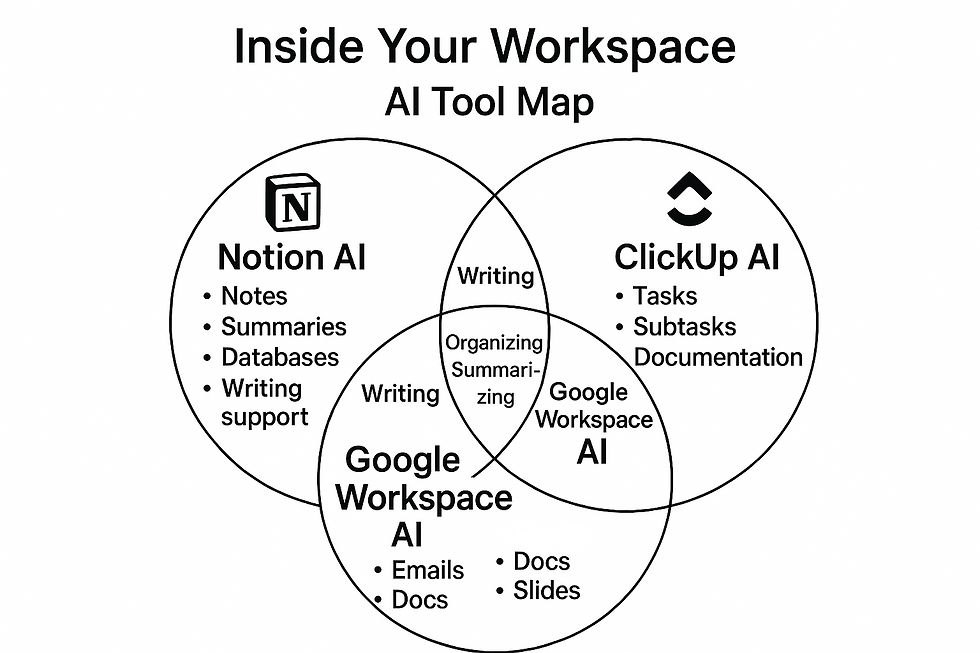
Notion AI and the Power of Organized KnowledgeNotion AI acts like a dynamic knowledge system that adapts to the user. It gathers notes, documents, ideas, and tasks into one place and allows AI to summarize, rewrite, and categorize them. In my time, workers often lacked a unified method for storing information, leading to confusion and duplication. Notion AI corrects that by bringing everything under a single system of order. When you allow AI to extract key points, generate summaries, or create project outlines, you remove the burden of sorting through information manually. This aligns perfectly with the goal of finding the most efficient way for knowledge to flow within a workspace.
ClickUp AI and the Discipline of Structured WorkClickUp AI reminds me of the structured planning required in Scientific Management. Every goal must break into steps, every step into tasks, and every task into measurable actions. ClickUp takes this philosophy and embeds it directly into the digital environment. With AI generating subtasks, writing documentation, and turning ideas into actionable plans, it creates order where there was once ambiguity. It helps teams and individuals see exactly what needs to be done without uncertainty. ClickUp AI supports the principle that work should never rely solely on human memory or improvisation—systems must guide actions so that workers can focus on execution.
Google Workspace AI and the Speed of Modern CommunicationGoogle Workspace AI introduces efficiency into daily communication and documentation. Whether drafting emails, summarizing documents, or generating spreadsheets, it accelerates the flow of information. In the factories I studied, delays often occurred because information was passed slowly or inconsistently. Google’s tools correct this by making communication nearly instantaneous. AI can turn long reports into concise summaries, draft responses before you begin typing, or turn raw data into structured insights. When communication flows quickly and clearly, the entire system benefits.
Bringing Order to Everyday Digital TasksAutomation inside the workspace is not about removing the human role. It is about ensuring that tasks requiring judgment, creativity, or leadership are not overshadowed by monotonous chores. When AI performs the repetitive actions—summarizing text, generating tasks, organizing notes—you create a predictable environment where workers can think instead of merely react. The system becomes stable, and stability is the foundation for improvement.
The Importance of Standardizing Digital WorkOne of the key lessons I taught was that every task should have a defined best method. Today, automation tools help enforce these standards inside digital workspaces. Whether using templates, AI-generated workflows, or automated task creation, these tools ensure that processes are not reinvented daily. They create consistency. They reduce variation. They allow every worker to follow the best-known method without needing constant instruction.
Automation as the Modern Expression of EfficiencyInside today’s workspaces, automation is the invisible hand that shapes order from chaos. It takes the principles of efficiency and applies them not to shovels and machines, but to documents, messages, schedules, and projects. When used properly, these tools become the modern equivalents of standardized tools and measured workflows. They create the conditions for predictable success. The greatest advantage of automation in digital work is not speed alone—it is the liberation of human effort for higher levels of thought and innovation.
Using Bardeen.ai for Browser-Level Automation – Told by Zack Edwards
When I first encountered Bardeen.ai, I realized I had stumbled onto a different kind of automation—one that didn’t wait for apps to talk to each other behind the scenes. Instead, it lived right where I spent most of my time: the browser. Bardeen wasn’t about building long, multi-step workflows on remote servers. It was about automating the small, repetitive actions I performed every day on websites, dashboards, and online tools. It offered a kind of power that felt personal, immediate, and incredibly practical.

Automating the Endless Copy-and-Paste CycleIf you’ve ever copied text from one tab and pasted it into another again and again, you know how draining that cycle becomes. Bardeen breaks that cycle. With a single automation, it can lift data from a website and place it exactly where it needs to go—into a document, a spreadsheet, a CRM, or a note-taking app. Instead of spending time transferring information, you suddenly find yourself free to interpret, analyze, and act on it. It turns a dull task into a quick, automated step, and that shift alone saves hours over the course of a week.
Scraping Lists Without Manual LaborOne of the most powerful features Bardeen offers is the ability to scrape structured information directly from a webpage. Whether I was gathering leads from a business directory, collecting event dates, or capturing product details from an online catalog, Bardeen could read the page and extract the information into clean, usable data. It wasn’t just fast—it was precise. Rather than copying line by line, I could let the browser read and organize the data for me. The moment I saw it work, I understood how many workflows I had hesitated to automate simply because the steps felt too tedious to itemize.
Filling Forms with Accuracy and SpeedFilling out forms is one of those deceptively simple tasks that consume more time than we realize. Re-entering your name, email, company info, or description fields again and again can quickly wear down your patience. Bardeen allows the browser to fill these forms automatically, pulling information from your saved data or from previous entries. This isn’t just faster—it’s more accurate. Mistakes disappear, consistency strengthens, and you regain time that would otherwise slip away unnoticed.
Sending Emails Without Opening Your InboxAnother surprising strength of Bardeen is its ability to send emails directly from wherever you’re working. If I scraped a list of contacts, I could immediately trigger emails to them without switching tabs or setting up large workflows. It merges the action of gathering information with the action of responding to it, all inside the same browser session. This simple combination creates a sense of flow—information comes in, and action goes out—without the friction of navigating between apps.
Building Automations That Feel Like Extensions of ThoughtThe real magic of Bardeen is that it lets you automate in the moment. You don’t have to plan an elaborate workflow ahead of time. If you notice yourself repeating a task—clicking the same button, copying the same data, navigating the same path—you can create a quick automation that captures those steps. Over time, the browser begins to behave less like a tool and more like an assistant that anticipates your needs. It becomes an extension of your thinking process, helping you move faster and stay focused on the meaningful parts of your work.
Why Browser-Level Automation MattersAutomation is often discussed in terms of big systems and large-scale processes, but the truth is that most of our day is spent on small tasks inside the browser. These tasks add up. They drain energy and attention that could be spent on creativity, strategy, planning, or problem-solving. Bardeen.ai addresses the small inefficiencies that we often overlook and gives us back control of our time at the micro level. It turns the browser into a powerful environment where the everyday tasks you once performed manually become effortless, repeatable, and efficient.
Designing Your First Automation Pipeline – Told by Zack Edwards
When I guide people through their first automation pipeline, I tell them not to think of it as a technical build. Instead, think of it as a flow of events—one step leading naturally to the next. An automation pipeline is simply a way to let your tools perform work for you based on predictable patterns. Once you see those patterns clearly, the pipeline becomes easy to design. It’s less about technology and more about understanding how your tasks behave.

Starting with the Trigger That Sets Everything in MotionEvery automation begins with a trigger. The trigger is the moment the system receives a signal to start. It might be something simple, like receiving an email or adding a new file to a folder. It might be a scheduled time each day. When I build automations, I start by asking myself, “What event should wake this process up?” Getting the trigger right is essential, because if it fires too often or not often enough, the rest of the pipeline won’t work as intended.
Defining the Logic That Holds the Process TogetherOnce the trigger is set, the next step is to define the logic—essentially the brain of the pipeline. This is where I determine what should happen next, and under what circumstances. Logic helps the automation make decisions. It might branch into different paths depending on the content of an email, the type of file being uploaded, or the value in a spreadsheet column. Logic transforms a simple chain of events into a flexible system that reacts properly to whatever information enters it.
Using Filters to Keep the Pipeline CleanFilters act like gates inside the pipeline. Their job is to stop the workflow from continuing unless certain conditions are met. I use filters to ensure that the automation only handles the tasks I actually want automated. For example, if I only want emails marked “urgent” to create new tasks, the filter handles that. Without filters, a pipeline becomes messy, firing too often and cluttering your workspace with unwanted results. Good filters keep your system lean and purposeful.
Executing the Actions That Do the WorkActions are where the visible work happens. They send emails, create tasks, update spreadsheets, move files, or send notifications. When I design actions, I ask myself, “What is the outcome I want here?” Actions should be simple, direct, and reliable. If the automation has several steps, each action should depend on the work done before it. A well-designed set of actions creates a smooth, predictable path that requires no supervision once it’s running.
Testing the Pipeline Before Letting It RunTesting is the stage too many people skip, and they regret it later. I always run a pipeline test using sample data. This helps me see if the trigger fires correctly, if the logic works, if the filters behave as intended, and if the actions complete without errors. Testing is not about perfection—it’s about catching surprises. A small mistake can multiply once the pipeline is live, so testing gives me confidence that everything is functioning as expected.
Deploying the Automation and Letting It Work for YouWhen the test run succeeds, deployment is simply clicking “activate.” But I don’t walk away completely. For the first couple of days, I keep an eye on the workflow to make sure it behaves correctly in real-life conditions. Once I see it run smoothly, I let it fade into the background. At that point, the automation becomes a silent assistant, handling tasks without drawing attention to itself. The beauty of deployment is realizing that a piece of work you once did manually is now happening automatically, freeing your time for something more meaningful.
Understanding the Flow You Just BuiltThe real reward in designing your first automation pipeline is the shift in thinking that follows. You start to see your work not as a list of tasks, but as a series of flows—each one capable of being automated, improved, or optimized. Trigger, logic, filters, actions, testing, deployment—these steps become second nature. Once you master them, you can build automations that support every part of your personal and professional life.
Building Personal Productivity Systems with AI – Told by Frederick Winslow Taylor
When I look at the modern world and the tools now available, I see that productivity has shifted from the factory floor to the digital workspace. Yet the underlying principle remains unchanged: clarity, structure, and consistency create efficiency. Building personal productivity systems with AI is not about chasing convenience—it is about constructing a framework where every task, reminder, and piece of information has its proper place. The goal is to allow your mind to focus on higher-level decisions rather than remembering or organizing the details.
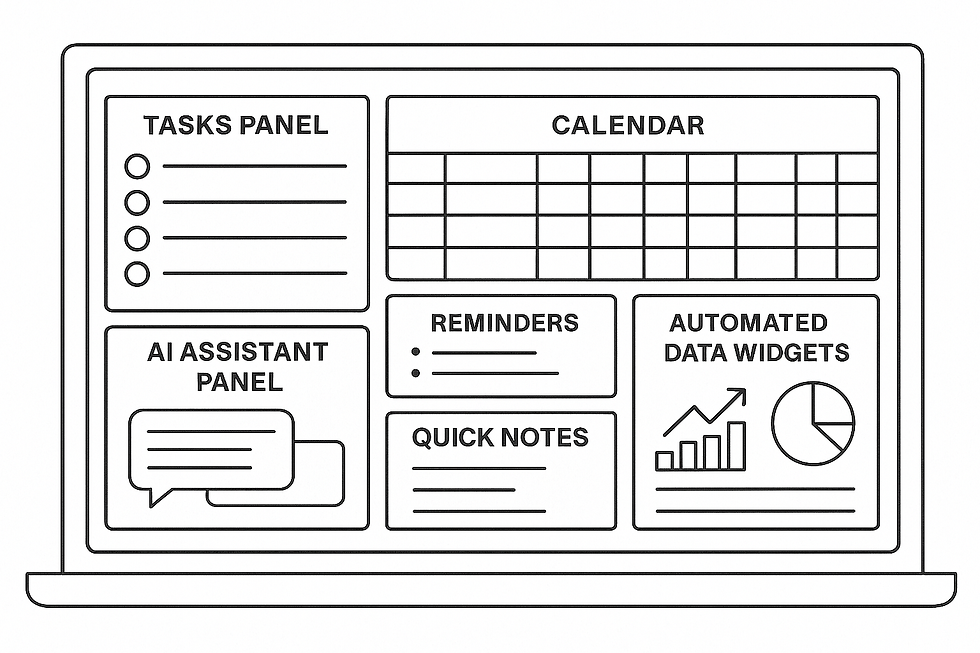
Creating Dashboards That Reflect the Real Work Being DoneA dashboard is the digital equivalent of the organized workstation I always encouraged. Instead of tools arranged neatly on a bench, you have information arranged neatly on a screen. AI helps assemble these dashboards by pulling together tasks, notes, deadlines, and priorities into one unified view. When you design a dashboard, you are defining what information matters most. AI keeps it updated, ensuring that your daily decisions are guided by accurate, current data rather than scattered pieces of information hidden across different apps.
Automated Reminders as a Replacement for Mental BurdenOne of the greatest inefficiencies in any system is relying on memory. In my time, I saw workers forget steps, skip inspections, or lose track of timing simply because they were asked to remember too much. Today, AI reminders take that burden away. Automated reminders can be triggered by dates, completed tasks, or even changing conditions inside your workspace. They ensure that nothing is forgotten, and they do so without creating additional mental strain. This simple shift ensures that attention is spent on action rather than recall.
AI Planning Assistants That Bring Order to ComplexityPlanning is a form of organizing future work, and AI now performs this function with remarkable precision. Planning assistants can break goals into tasks, estimate timelines, identify dependencies, and even generate step-by-step execution plans. When you feed an AI assistant a goal—whether personal or professional—it can outline the path forward. This is the modern expression of what I once taught: that every objective must be broken into smaller, organized elements. AI does this breakdown instantly, turning vague intentions into concrete, actionable steps.
Building Recurring Workflows That Preserve EfficiencyRecurring workflows are the backbone of stability in any system. In factories, these were the standardized procedures that ensured consistent output day after day. In the digital world, AI allows you to automate these recurring patterns. Whether it is a weekly report, a monthly review, or a daily planning ritual, AI can handle the repetition. The value lies not just in the time saved, but in the reliability created. A recurring workflow is performed the same way every time, ensuring quality, speed, and predictability.
Turning Productivity into an Organized CycleWhen dashboards, reminders, planning assistants, and workflows come together, they create a cycle of productivity that sustains itself. The dashboard gives you visibility. Reminders ensure timely action. Planning assistants define the steps ahead. Recurring workflows execute them with consistency. There is no guesswork and no wasted motion. Instead, you have a disciplined system that supports you every day. This is the essence of productivity: not working harder, but designing an environment where the work moves smoothly and reliably.
The Benefit of Letting AI Support the SystemAI does not replace initiative or decision-making. Rather, it strengthens the foundation on which both are built. By handling the predictable, repetitive, and organizational aspects of your work, AI allows your energy to shift toward improvement and creativity. A well-designed productivity system is one where every task fits naturally into place, where nothing slips through unnoticed, and where your time is directed toward meaningful effort. With AI, this level of order is not only possible—it is accessible to anyone willing to design their system with intention and structure.
Automation for School, Work, and Business – Told by W. Edwards Deming
Automation, when properly understood, is not intended to replace the human mind. It is designed to relieve it. In schools, workplaces, and businesses, countless hours are spent performing tasks that require little judgment but considerable time. Automation provides an opportunity to shift human energy toward learning, improvement, and meaningful decision-making. In every environment, from the classroom to the boardroom, automation becomes an ally when it simplifies the predictable and clears space for the thoughtful.
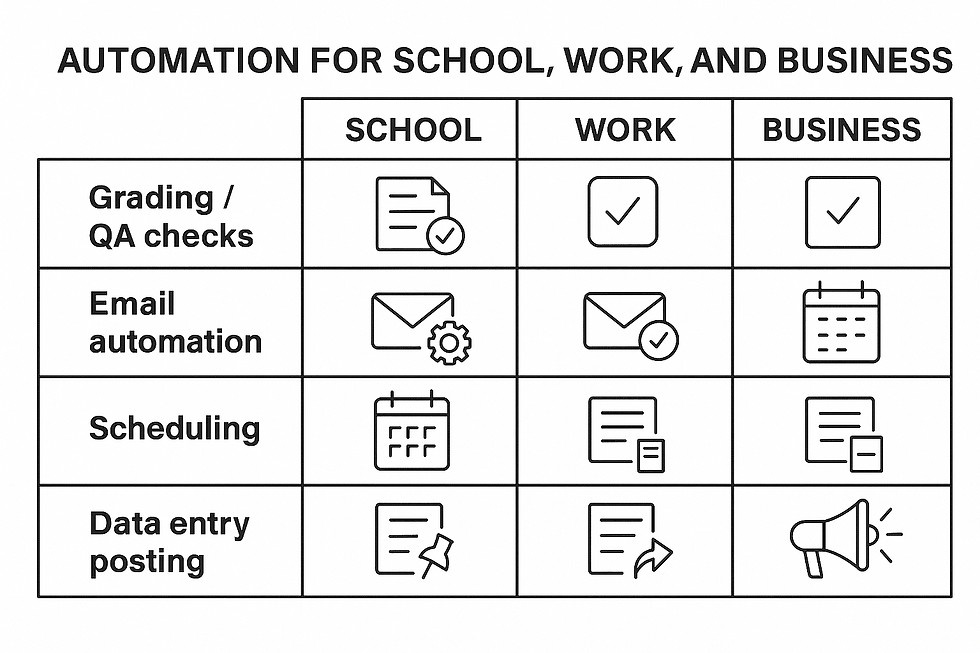
Using Automation to Support Learning and GradingIn school settings, teachers often struggle under the weight of administrative work. Automating parts of the grading process can allow them to focus on instruction rather than sorting papers or tallying points. Tools can check quizzes, organize submissions, and track student progress without fatigue or inconsistency. Automation can also deliver reminders to students, generate study summaries, and transform raw notes into organized, readable materials. These processes create stability and clarity, which are essential for learning to flourish.
Streamlining Email Responses Across RolesEmail has become one of the major interruptions in modern life. Many messages require similar responses or predictable actions. Automation can identify these patterns and handle common replies with speed and accuracy. Whether confirming appointments, sending forms, or following up on inquiries, automated email flows bring consistency to communication. They also reduce variation, which is a principle I encouraged throughout my work. When communication becomes predictable, people are freed from the burden of reacting constantly to their inboxes.
Creating Reliable Scheduling SystemsScheduling is another area where human error and inconsistency often arise. Automated systems can coordinate calendars, send reminders, and adjust appointments without requiring constant manual attention. In schools, this helps students stay organized. In workplaces, it keeps meetings and deadlines aligned with real capacity. In businesses, it ensures clients receive timely communication and predictable service. Good scheduling automation removes confusion, minimizes missed commitments, and reinforces a sense of order.
Tracking Leads and Customer Information with AccuracyIn business environments, managing leads and customer interactions is critical. Yet the process of recording, updating, and following up can easily break down when handled entirely by hand. Automation brings system-level control to these tasks. Information can be captured from forms, emails, or meetings and sent directly into databases or CRMs. Follow-up messages can be scheduled immediately, ensuring no opportunity is lost to oversight. This creates a steady, predictable pipeline where results depend on the system rather than individual memory.
Maintaining Consistency in Social Media PostingIn the modern age, social media has become a central communication channel. But regular posting requires discipline that few busy individuals can maintain on their own. Automation can schedule content, distribute it across platforms, and organize the flow of updates that keep a school, organization, or business visible. Instead of scrambling to create new posts each day, users can prepare content in advance and let the system maintain the rhythm. This prevents gaps, reinforces consistency, and allows creativity to be expressed in a structured manner.
Strengthening Systems Through Predictable AutomationAcross all of these environments—school, work, and business—the goal of automation is the same: reduce variation, eliminate waste, and support human beings in their more important work. When tasks such as grading, emailing, scheduling, lead tracking, and posting are handled by reliable systems, people gain time and clarity. Automation is not the end of human effort. It is the beginning of more meaningful effort. The system becomes stable, and once stability is achieved, improvement becomes not only possible but inevitable.
AI as Your Digital Executive Assistant
There came a point in my work when I realized that most of what slowed me down wasn’t the creative or strategic effort—it was the administrative load that wrapped around it. Emails, scheduling, follow-ups, research gathering, document organization, and report writing all demanded small but constant attention. When I began combining AI tools into a unified system, I discovered that the digital world could function like an executive assistant, handling these pieces automatically so I could stay focused on the work that actually moved projects forward.

Automating Administrative Work Before It Reaches Your DeskOne of the first areas I automated was the basic administrative tasks that repeated daily. AI could sort emails into categories, reply to routine messages, and route more important ones into a priority folder. It could take meeting notes and turn them into actionable tasks. It could prepare agendas, reminders, and follow-ups without my input. Instead of starting each day by “getting organized,” I found myself already organized, with a clear snapshot of what needed attention and what had already been handled. This shift alone changed the pace of my mornings.
Using AI to Support Deep and Ongoing ResearchResearch can easily consume hours, especially when it involves scanning articles, comparing sources, or gathering historical or technical details. By pairing AI tools with automated workflows, I was able to delegate much of this research work to the system itself. Tools could scan websites, extract key information, and summarize long documents into digestible insights. They could even monitor specific topics and notify me when new developments appeared. The result was a steady stream of organized, relevant research delivered without constant searching.
Turning Ideas into Writing with AI AssistanceWriting is one of the most time-intensive parts of my work, and AI became an ideal assistant in this area as well. It could draft early versions of articles, create outlines, format sections, or summarize my verbal notes into clean text. It didn’t replace my voice, but it gave me a foundation so I could spend my energy refining ideas instead of building documents from scratch. AI allowed me to start halfway through the writing process, already supported by structured information and clear phrasing.
Automating Reports That Keep You Informed Without Extra LaborReports are essential for understanding progress, but creating them can drain significant time. By combining automation with AI, I set up systems that collected data, analyzed patterns, and produced weekly or monthly summaries without extra effort. Whether the report involved sales, project status, content performance, or student engagement, AI could compile the information into charts, bullet points, or narrative explanations. Instead of spending hours assembling data, I could simply review the results and make decisions based on them.
Building a Seamless Assistant Through Tool IntegrationThe real power emerges when these tools work together. Email filters feed ClickUp tasks. Research summaries feed Notion databases. Meeting notes feed communication drafts. Reports update dashboards. When these flows connect, the system behaves like a real assistant—one that remembers, organizes, and executes with precision. What once required constant switching between apps becomes a continuous stream of organized input and output. The assistant is digital, but its impact feels personal.
Letting AI Handle the Routine While You Lead the ImportantWhen you combine automation, research assistance, writing support, and reporting into a unified system, you build more than a set of helpful tools—you create a digital executive assistant that works every hour of the day. Its value isn’t in replacing the work you enjoy; it’s in clearing the path so your energy goes toward the decisions, conversations, and creative efforts that make a real difference. With AI managing the background noise, you step confidently into the roles that matter most, supported by a system that stays organized, consistent, and always ready for your next move.
Automation Safety, Limits, and Best Practices – Told by Zack Edwards, W. Edwards Deming, and Frederick Winslow Taylor
When the three of us sat down to discuss automation safety, we approached the topic from different eras but with a shared goal: ensuring that technology strengthens systems rather than weakens them. I, Zack Edwards, approached it from the standpoint of modern digital tools. Deming approached it as a guardian of systems thinking and quality control. Taylor, ever the observer of efficiency, focused on the structure of the processes themselves. Together, we explored how automation can elevate work—so long as it is applied with discipline and respect for its limitations.
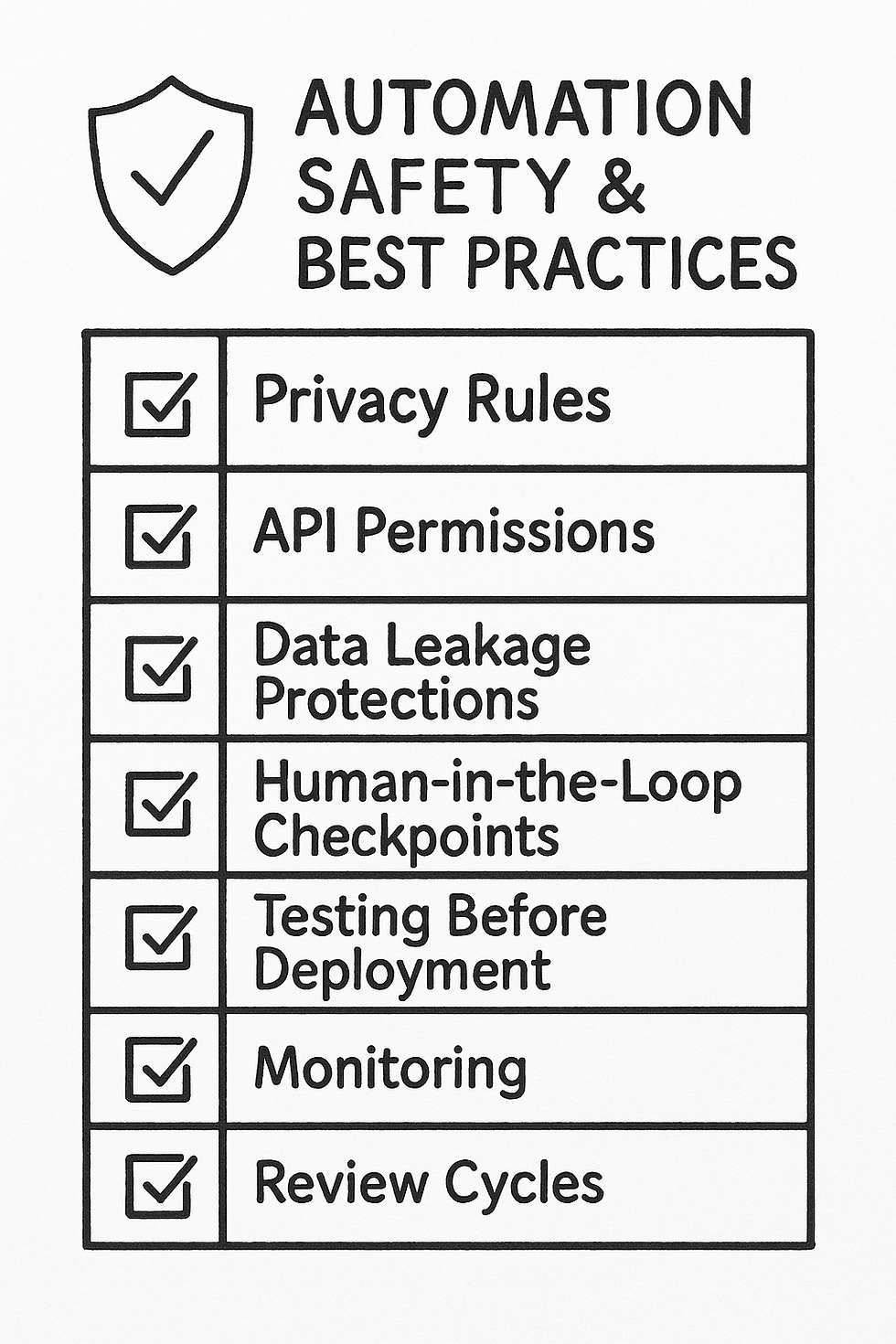
Understanding Privacy as the Foundation of TrustI began the discussion with a concern that defines our modern world: privacy. Today’s automations often rely on accessing emails, documents, messages, or customer information. If not handled carefully, these tools can expose personal or sensitive data. Taylor leaned forward and reminded us that trust in a system begins with clarity. Just as workers once wanted to know why their tasks were timed, modern users need to know what data an automation can see and what it will do with that information. Deming emphasized that without trust, no system can sustain improvement. Privacy is not optional—it is the foundation upon which all automation must rest.
API Access and the Importance of Clear BoundariesDeming led the next portion of the conversation by addressing API access. APIs are the bridges that connect tools, but an open bridge without boundaries invites risk. Automations must access only what they need, nothing more. Taylor nodded, saying it reminded him of creating specialized tools for specific tasks—nothing too heavy, nothing too light. API permissions must be tight, controlled, and regularly reviewed. When boundaries are clear, systems remain predictable. When boundaries blur, variation creeps in, and variation is the enemy of reliability.
Recognizing the Risk of Data Leakage in Connected SystemsData leakage was the next area we explored, and I noted how easy it is for information to spill into the wrong place when automations connect multiple apps. A spreadsheet sent to the wrong folder, a message forwarded to the wrong person—small errors can grow into large consequences. Taylor compared it to a poorly placed machine on a factory floor: if the output lands in the wrong area, the entire workflow suffers. Deming reinforced the idea that systems must be designed to prevent unintended outputs. Every automation should include guardrails that catch accidental misrouting or over-sharing before it happens.
Building “Human in the Loop” Checks for StabilityDeming took the lead here, arguing that no automation should run without the possibility of human review. Even the best systems require checkpoints where a person verifies outcomes, approves decisions, or intervenes when circumstances fall outside normal patterns. Taylor agreed, noting that while efficiency is vital, unchecked automation can turn small errors into large-scale failures. I added that modern tools make it easy to send notifications, request confirmations, or pause workflows until a human approves the next step. By keeping people in the loop, we ensure that automation serves human judgment rather than replacing it.
Defining the Limits of Automation with IntentionTaylor emphasized that every system has limits, and ignoring those limits invites inefficiency. Automation should only handle tasks that are repetitive, predictable, and low-risk. When tasks require creativity, empathy, negotiation, or nuanced decisions, human involvement remains essential. Deming supported this with his philosophy: systems improve only when people think deeply about them. Automation should free people to think—not remove them from thinking entirely. My contribution was the reminder that modern AI tools are powerful, but they are still pattern followers, not independent thinkers. Respecting these limits prevents frustration and strengthens the overall workflow.
Best Practices That Keep Systems HealthyAs our conversation drew toward conclusion, we agreed on a set of shared best practices. Start with clear permissions. Keep automations narrow in scope. Test thoroughly before deployment. Review regularly. Maintain transparency about what data is used and why. Always allow for human review. Deming summarized it best: a stable system is one that is understood, monitored, and continually improved. Taylor added that efficiency requires structure, and structure requires thoughtful design. I closed by observing that automation is most powerful when it becomes a partner—not a replacement—in our daily work.
Using Automation as a Tool for Strength, Not RiskWe ended with a shared perspective: automation is a remarkable advancement, but it must be used responsibly. When privacy is respected, boundaries are clear, data is protected, and humans remain involved, automation becomes a force for clarity and stability. When those principles are ignored, the system becomes fragile. With careful design and ongoing oversight, automation becomes not just a convenience, but a trustworthy component of a well-functioning digital world.
A 30-Day Automation Challenge
When I created the 30-Day Automation Challenge, my goal wasn’t to overwhelm anyone with advanced workflows. Instead, I wanted to guide readers through a series of small, achievable steps that build confidence day by day. Automation becomes powerful when you understand not just how it works, but how each piece connects to form a personal system that supports your goals. This challenge is designed to help you experience that transformation gradually, one simple task at a time.

Starting with Awareness and Simple Daily TasksThe first week focuses on awareness. Before building anything, you must learn to recognize the routines and patterns that shape your day. These early tasks involve identifying repetitive actions, organizing your digital tools, and preparing the foundation for automations to come. You might set up basic email filters, create a clean folder structure, or list the tasks you perform most often. These small steps reveal opportunities for automation that often hide in plain sight.
Building Core Automations That Save Immediate TimeDuring the second week, the challenge introduces practical workflows that produce immediate results. These might involve automatically creating tasks from emails, generating daily planners with AI, or syncing notes between different apps. The goal is to help you feel the shift that automation creates—the way it removes friction from your work. Each task is simple enough to complete in minutes but meaningful enough to demonstrate the value of automation in your daily life.
Expanding Automations into Multi-Step WorkflowsBy the third week, you’ve built confidence with basic automations, so the challenge gradually expands into multi-step workflows. These tasks might involve gathering information from websites, organizing it into databases, or generating reports based on your activity. This is where automation begins to feel like a true assistant. You start to see how triggers, filters, logic, and actions flow together to form a system that consistently supports your priorities.
Building Personal Productivity Systems With AI SupportAs the month progresses, the challenge introduces AI-powered tasks that deepen your systems. You may create an AI-generated weekly planning routine, set up automated summaries of notes or meetings, or design dashboards that display your goals and progress. These automations begin to shift your relationship with your tools. Instead of reacting to tasks, your system begins presenting organized information that helps you act with clarity and purpose.
Connecting Multiple Automations Into a Unified FlowIn the final days, the challenge focuses on integration. All the small automations you created begin to connect into a cohesive system. Your email feeds your task manager. Your research feeds your notes. Your notes feed your reports. Your schedule updates your reminders. This integration is where everything comes together. You begin to experience the feeling of being supported by a digital ecosystem you intentionally designed.
Reflecting on the Growth and Preparing for ExpansionThe final step of the challenge encourages reflection. After 30 days, you’ve built a set of automations, but more importantly, you’ve built a habit of noticing patterns and strengthening systems. You understand how automation works, how it improves efficiency, and how to adapt it to different parts of your life. This reflection sets you up for continued growth. You leave the challenge not with a finished product, but with a mindset that views every repetitive task as an opportunity for improvement.
Creating a System That Grows With YouThe true value of the 30-Day Automation Challenge is not the list of tasks—it’s the evolution of thinking. Automation is not a luxury or an optional enhancement. It’s a way of designing your life so that routine work is handled consistently, leaving your energy free for creativity, relationships, strategy, or rest. By the end of the 30 days, you’ve built more than a system. You’ve built a foundation for a more organized, intentional, and efficient version of yourself.
Vocabular to Learn While Learning About AI Apps and Chatbots
1. Trigger
Definition: An event that starts an automated process.Sentence: Receiving a new assignment email served as the trigger for creating a task in ClickUp.
2. Integration
Definition: A connection between two apps that allows them to share data or perform tasks together.Sentence: The Google Calendar integration allowed her reminders to appear instantly on her phone.
3. Data Privacy
Definition: The protection of personal information from unauthorized access or sharing.Sentence: Before turning on the automation, the teacher checked the data privacy settings to keep student information secure.
4. Bot
Definition: A computer program that performs automated tasks.Sentence: The bot sent daily summaries of homework assignments to every student in the class.
5. Dashboard
Definition: A digital screen that shows important information in one place.Sentence: Her productivity dashboard displayed upcoming deadlines, new emails, and unfinished tasks.
6. Template
Definition: A pre-made structure you can reuse to save time.Sentence: The AI used a meeting-notes template to organize everything discussed during class.
7. Optimization
Definition: The process of improving something to make it faster, easier, or more efficient.Sentence: Adding filters to the workflow helped with the optimization of the entire automation pipeline.
8. Human-in-the-Loop
Definition: A system where a human reviews or approves automated steps before they continue.Sentence: For safety, the AI writing automation had a human-in-the-loop step before sending emails to parents.
9. Recurring Task
Definition: A task that repeats on a regular schedule—daily, weekly, or monthly.Sentence: The recurring task reminded him every Friday to review his project progress.
10. Data Leakage
Definition: When private or sensitive information is accidentally shared, exposed, or sent to the wrong place.Sentence: The team added extra filters to prevent data leakage while syncing files between apps.
Activities to Demonstrate While Learning About AI Apps and Chatbots
Build Your First Automation (Using Zapier or Make.com) – Recommended: Advanced Students
Activity Description: Students create a simple automation that connects two everyday apps—such as sending themselves a reminder when they get an email from the teacher or collecting form submissions into a spreadsheet.
Objective: To teach students how triggers and actions work in real automation systems.
Materials:• Computer or Chromebook• Internet access• Free Zapier or Make.com account• Email or Google Workspace account
Instructions:
Explain triggers and actions using a real-life example (e.g., “When the bell rings → class starts”).
Have students choose a simple workflow such as:
• “When I star an email → create a task in Google Tasks.”
• “When a Google Form is submitted → add a row to Google Sheets.”
Guide students through building their automation in Zapier or Make.com.
Test the automation by running the trigger event.
Have students reflect on how this automation saves time.
Learning Outcome: Students gain hands-on experience designing a basic automation and understand how digital tools communicate through triggers and actions.
AI as a Research Assistant (Using Notion AI or Google Docs) – Recommended: Advanced Students
Activity Description: Students use a built-in AI tool to research a simple topic—such as “How do honeybees communicate?”—and then automatically organize the information into a structured note or small report.
Objective: To help students understand how AI can gather, summarize, and structure information.
Materials:• Computer or tablet• Notion AI or Google Docs with AI enabled• List of simple research topics
Instructions:
Assign a topic or let students choose their own.
Have students ask the AI tool to summarize articles or produce an outline.
Students refine the AI response by adding details, images, or citations.
They organize their final note into sections such as “What I Learned,” “Interesting Facts,” or “New Questions.”
Discuss how AI improves efficiency—but still needs human oversight.
Learning Outcome: Students understand how AI can support research and writing while learning to check for accuracy and clarity.
Browser Automation Challenge (Using Bardeen.ai) – Recommended: Intermediate to Advanced
Activity Description: Students explore how Bardeen.ai can automate browser actions such as copying text, scraping lists, or filling forms. They complete a challenge to gather information from a website and organize it into a document.
Objective: To demonstrate how AI can eliminate repetitive tasks done directly inside the browser.
Materials:• Laptop or desktop computer• Bardeen.ai installed• Access to a simple website with lists (e.g., a list of planets, animals, inventors)
Instructions:
Show students an example of scraping a list from a webpage.
Assign a challenge—for example:
• “Scrape all planets and export them into a Google Doc.”
• “Copy all book titles from a page and sort them in a spreadsheet.”
Students build a quick Bardeen automation using drag-and-drop actions.
They run the automation and check the results for accuracy.
Students present what they automated and how much time it saved.
Learning Outcome: Students learn how browser automation works and gain confidence using a real automation assistant to handle repetitive online tasks.
Create Your AI Executive Assistant (Dashboards) – Recommended: Intermediate to Advanced
Activity Description: Students build a personal productivity dashboard using Notion or ClickUp and use AI to generate reminders, organize tasks, and help plan their week.
Objective: To teach students how AI supports personal organization and goal-setting.
Materials:• Computer• Notion, ClickUp, or Google Workspace• AI-enabled features (Notion AI, ClickUp AI, Google Productivity AI)
Instructions:
Guide students in creating a basic dashboard with:
• Tasks
• Calendar
• Homework or project list
• Quick notes
Have students use AI to:
• Write their weekly plan
• Generate reminders
• Summarize their tasks
• Suggest priorities
Students customize the layout to match their personality or workflow.
End with a reflection on how dashboards help manage schoolwork.
Learning Outcome:Students learn how AI enhances personal productivity, turning organization into a simple, automated system they can use for school, extracurricular activities, or real-life responsibilities.
Create Your AI Executive Assistant (Dashboards & Reminders)
When I first discovered how powerful AI could be inside a personal dashboard, it felt like unlocking a hidden room inside my digital world. Suddenly, the daily details of my life—tasks, reminders, plans, deadlines—could be organized automatically, summarized instantly, and rearranged with almost no effort. Today, I want to take you through the same experience. By the end of this activity, you’ll have your own AI-powered executive assistant working inside Notion or ClickUp, helping you plan each week with clarity and confidence.
Step 1: Choose Your Workspace ToolIn this activity, you can build your assistant in one of two platforms:
• Notion – https://www.notion.so• ClickUp – https://www.clickup.com
Notion is ideal for students who like flexible pages, notes, and linked databases.ClickUp is perfect for students who want structured task lists, projects, and automations.
Choose whichever feels right—both will give you a powerful AI assistant.
Step 2: Create a New “Executive Assistant Dashboard”Inside your chosen platform:
In Notion:
Click Add a Page
Name it: My Executive Assistant Dashboard
Choose Empty with Icon
Add a simple emoji like 🤖 or 📅
In ClickUp:
Go to your Workspace Home
Click New Page → Dashboard
Name it: My AI Executive Assistant
Choose a blank layout
This is the central hub where everything will come together.
Step 3: Add Your Core PanelsYour dashboard needs six main sections:
Tasks
Calendar
Quick Notes
Reminders
AI Assistant Panel
Automated Data Widgets
Let’s build each one.
Step 4: Create the Tasks Panel
In Notion:
Type “/database inline” → choose Table – Inline
Rename it: Tasks
Add columns:
• Task Name
• Status (select: To Do, Doing, Done)
• Due Date
• Priority
AI Prompt: “Rewrite my task list and categorize it into Priority, Due Date, and Status. Make it concise and organized.”
Paste your messy task list, and Notion AI will clean it up instantly.
In ClickUp:
Add a Task List widget
Choose your personal space or create a new list called Tasks
Add views: List, Calendar, and Board
ClickUp AI can also convert raw text into tasks by selecting text and clicking AI Tools → Convert to Tasks.
Step 5: Add Your Calendar Panel
In Notion:
Type /calendar → choose Calendar – Inline
Link it to the Tasks database if you want deadlines to appear automatically
(Click: “+ Add a relation” → choose Tasks → relate Due Date)
In ClickUp:
Add a Calendar widget
Select which tasks or events to display
Choose colors based on Priority or Status
Your calendar now updates itself automatically as tasks change.
Step 6: Build Your Quick Notes Panel
In Notion:
Type /toggle list → name it Quick Notes
Add toggles like: Ideas, Class Notes, Reminders from Teachers, Personal Projects
Let AI summarize long notes with:
“Summarize this note into 3 bullet points.”
In ClickUp:
Add a Rich Text widget called Quick Notes
Use ClickUp AI → Summarize to condense your text anytime
This panel becomes your catch-all space.
Step 7: Create the Reminders System
In Notion:Use the AI assistant to create recurring reminders:
Prompt: “Create a list of daily school reminders I should follow, with checkboxes and repeated tasks Monday through Friday.”
Then highlight the AI output → turn it into a template button so it resets each day.
In ClickUp:ClickUp has built-in automations such as:“When task is due → Send reminder to me.”
To activate:Settings → Automations → Add AutomationThen choose a template like:Due Date → Send Notification
Step 8: Build Your AI Assistant PanelThis is where your dashboard becomes powerful.
In Notion:Create a new section called AI Assistant Panel.Add text blocks like:
• “Weekly Summary”• “Plan My Week”• “Rewrite My Goals”
Then add AI prompts underneath each.
Weekly Summary Prompt: “Analyze all tasks due this week in the Tasks database and create a bullet-point summary with priorities and suggestions.”
Plan My Week Prompt: “Generate a weekly schedule based on my upcoming tasks, hardest deadlines, and priorities. Make it realistic for a student.”
Rewrite My Goals Prompt: “Rewrite my goals in clear, actionable steps using simple student-friendly language.”
In ClickUp:Use AI Assistant inside any widget and paste the same prompts.
Step 9: Add Automated Data Widgets (KPIs & Summaries)Students LOVE this part because it makes their dashboard feel professional.
Ideas for Widgets:• Tasks Completed This Week• Tasks Overdue• Number of Hours Logged• # of Assignments Per Class• Practice Log for Extracurriculars
In Notion:Use Rollups, Formulas, and Relations to calculate totals and completion rates.
In ClickUp:Use built-in Dashboard Widgets:• Completed Tasks• Trends• Workload by Priority• Time Tracking Charts
Step 10: Use Your Assistant to Plan Your WeekEach Monday morning, run these prompts:
1. Weekly Kickoff Prompt: “Summarize everything I need to do this week by category: school, personal, projects, deadlines, and reminders.”
2. Time Blocking Prompt: “Create a time-blocked schedule for this week based on my calendar and task deadlines.”
3. Top 3 Priorities Prompt: “Identify my top three priorities for the week and explain why they matter.”
Step 11: Celebrate Your Fully Built Executive AssistantBy now, your dashboard is no longer just a page—it’s a system.It reminds you.It organizes you.It plans with you.It reduces mental load.It clears your path.
You’ve built a real executive assistant, powered by AI, customized for your life.



Comments